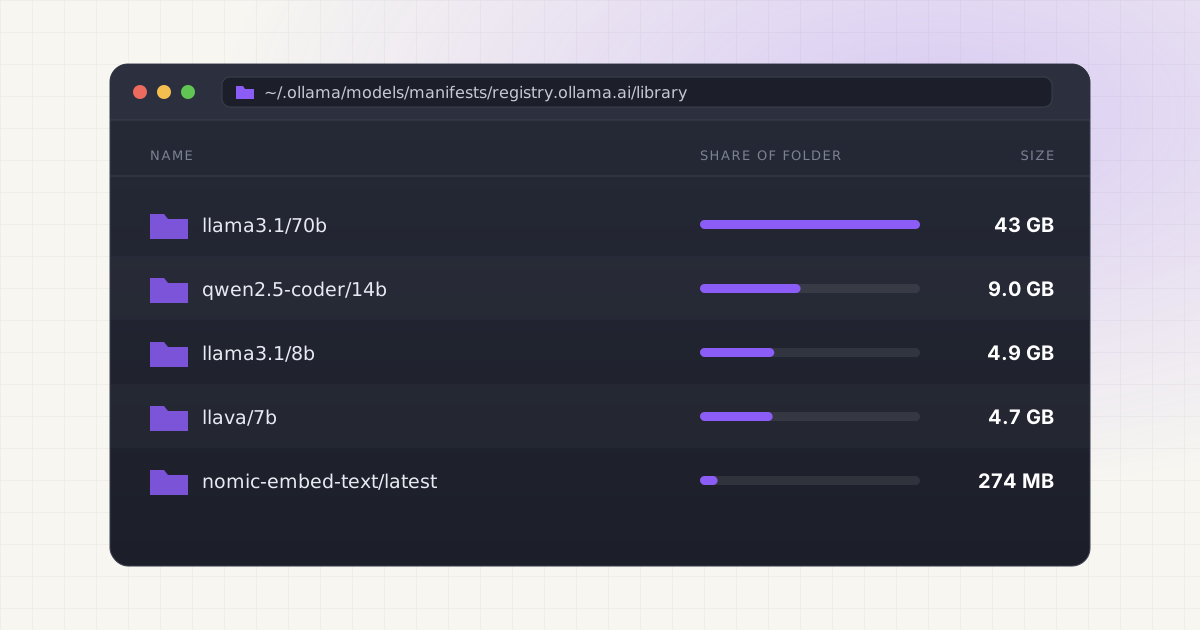
Open-source agent frameworks made it trivially easy to run powerful AI workflows entirely on your own machine. No API keys, no cloud, nothing leaving your laptop. That independence feels great right up until your SSD hits 10% free space and you have no idea which of the six tools you installed is responsible.
Key takeaways
- A single 70B model at Q4 quantization runs roughly 42GB, and most setups keep several models around at once.
- Agent memory, tool logs, and embedding caches add up alongside the model weights, not instead of them.
- Multi-agent frameworks often duplicate models and vector stores per project, multiplying storage silently.
- There is no single folder that shows your full local AI footprint.
The storage is not just the model
When people think about local LLM storage, they picture the model weights. Fair enough, those are the biggest single files on disk. A quantized 8B model like Llama 3.1 runs around 4.9GB at Q4_K_M, and a 70B model at the same quantization level lands closer to 42GB. That is real weight. But the model file is only the part you can see easily. Depending on your setup, a local agent workflow also leaves behind:
- Agent workspace files and session history, sometimes one folder per project or per run
- Tool call logs and execution traces, which some frameworks never rotate or delete
- Local memory and context files, including vector embeddings for retrieval-augmented generation
- Downloaded tool dependencies, Python packages, and helper binaries pulled in on first run
- Temporary files from multi-step workflows that assume you will clean them up yourself
- Cached model outputs and intermediate results, particularly in frameworks that support replay or caching
None of these individually is huge. Together, spread across a dozen hidden directories, they can easily add up to more disk space than the model files themselves. AutoGen, for instance, ships with built-in LLM response caching to disk specifically so repeated calls do not re-hit the model, which saves compute time but quietly grows a cache directory that most users never look at. CrewAI leans on SQLite for long-term memory storage, so every project that uses memory gets its own database file sitting somewhere in your home directory.
How big are the models, really
It helps to have real numbers instead of vague estimates. Quantized model size scales roughly with parameter count, and the quantization level you choose changes the file size a lot. Here is what typical Q4_K_M quantized weights look like for popular open-weight models, based on published GGUF files:
| Parameter count | Example model | Typical Q4_K_M size | Common use case |
|---|---|---|---|
| ~0.1-0.3B | nomic-embed-text, mxbai-embed-large | 270MB-670MB | Embeddings for RAG / retrieval |
| 7-8B | Llama 3.1 8B | ~4.9GB | Fast general-purpose chat, agent "worker" model |
| 14B | Qwen2.5 14B | ~9GB | Mid-tier reasoning, code generation |
| 32B | Qwen2.5 32B | ~19.9GB | Stronger reasoning on a single high-memory Mac |
| 70B | Llama 3.1 70B | ~42.5GB | Best local reasoning quality, agent "planner" model |
Notice the embedding models at the top of that table. They are small individually, a couple hundred megabytes each, but almost every RAG-based agent setup pulls in at least one, and it is common to have two or three different embedding models installed because different tools default to different ones. If you have read about where Ollama actually stores its models on a Mac, you already know these weights live in a directory most people never open.
Want to skip the hidden-folder hunt?
LLM Cleaner scans your Mac for local AI models, caches, indexes, and project memory — then shows what you can review, reveal, export, or safely move to Trash.
Multiple models for multiple agents
It is common to run different models for different jobs in an agent workflow: a large model for planning and reasoning, a smaller faster model for quick tool-calling, a dedicated code model for programming tasks, and a vision model if the agent needs to read screenshots or images. Each of those is a separate multi-gigabyte download. They do not share files, even when two models come from the same base architecture with a slightly different fine-tune. A planner running Llama 3.1 70B alongside a fast responder running Llama 3.1 8B means you are storing two entirely separate copies of a very similar architecture, roughly 47GB combined, just because the weights were quantized and packaged independently.
This gets worse when you experiment. Trying three different 8B instruction-tuned models to see which one follows your agent's system prompt best means three separate 5GB downloads sitting on disk, most of which never get deleted after you settle on a favorite. Anyone who has compared model options through Hugging Face's local cache on a Mac has probably run into this: the cache directory keeps every version you ever pulled unless you clear it manually.
Why multi-agent setups multiply the problem
Single-agent workflows are relatively contained. Multi-agent frameworks change the math. When you run a crew of agents, each with a distinct role, a common pattern is to give each agent its own memory store, its own tool cache, and sometimes its own model. A four-agent CrewAI pipeline with a researcher, writer, editor, and critic might reasonably use two different models (a fast one for routing, a capable one for the actual writing and editing) plus four separate SQLite memory databases plus a shared vector store for retrieval. Multiply that by every project you spin up, and you get a pattern where each new multi-agent experiment adds its own self-contained footprint rather than reusing what is already on disk.
Frameworks built for orchestration, like LangGraph and AutoGen, add checkpointing on top of that. Checkpoints let a workflow resume after a crash or a long pause, which is genuinely useful, but each checkpoint is a snapshot of agent state written to disk. Long-running or frequently-restarted agent workflows can accumulate hundreds of these snapshot files without anyone noticing, since they are usually small individually and easy to overlook next to a 40GB model file. Does it matter if a folder full of tiny JSON checkpoints adds up to a few hundred megabytes? Not on its own. But add it to duplicate models, multiple embedding caches, and unrotated logs, and the small stuff stops being small.
This is the same underlying pattern covered in why local AI agents fill up Mac storage and, for coding-specific agents, in how tools like Cursor and Claude Code accumulate project-level caches. If you are running coding agents alongside your local LLM setup, it is worth checking what Claude Code actually keeps around as project memory, since that is a separate storage source layered on top of everything described here.
Why you cannot just check folder sizes
The storage for a local agent workflow is scattered by design, not by accident. The model weights live in one place, usually a models directory tied to whichever runtime downloaded them, Ollama, LM Studio, or a raw Hugging Face cache. The agent memory and session history live somewhere else entirely, often nested inside the framework's own package directory or a project-local .cache folder. The vector store for RAG retrieval might be a third location, and tool-specific caches for things like web scraping or code execution sandboxes add a fourth and fifth. There is no single folder you can right-click and get "Get Info" on to see the full picture.
Command-line tools like du can tell you the size of a directory once you know which directory to check, but they cannot tell you which of six near-identical GGUF files is actually still referenced by an active agent config versus one left over from an abandoned experiment. That distinction matters, because deleting the wrong file breaks a workflow, and deleting nothing means the problem never goes away. Even people who are careful about scanning through why Ollama specifically eats disk space often stop there and miss everything the agent framework itself is adding on top.
The practical fix is not memorizing every hidden path these tools use. It's checking periodically with something that actually understands the difference between an active Ollama model, a duplicate Hugging Face download, and an orphaned agent cache, rather than treating every large file the same way.
Not sure what is safe to delete?
LLM Cleaner separates models, rebuildable caches, and project memory so you do not treat everything like junk.
Frequently asked questions
How much disk space does a typical open-source agent setup use?
It varies a lot, but a modest setup with one 8B model, an embedding model, and a couple of agent projects easily reaches 10-15GB. Add a 70B reasoning model or run multiple agent projects with separate memory stores, and 60GB or more is common. The models are usually the biggest single chunk, but not the only one.
Do agent frameworks delete their caches automatically?
Rarely, and not by default. AutoGen's disk cache and CrewAI's SQLite memory are both designed to persist across sessions on purpose, since that is what makes caching and long-term memory useful. Cleanup is left to the user, and most frameworks do not ship a built-in command to prune old or unused entries.
Can I safely delete old agent session logs?
Usually yes, as long as the agent framework is not actively mid-task or relying on that session for context in an ongoing conversation. Session logs and execution traces are typically write-once records rather than files the agent reads back later, but check your specific framework's docs before bulk-deleting, since a few use logs for replay or debugging features.
Why do I have multiple copies of what looks like the same model?
Different tools keep separate model stores. Ollama, LM Studio, and a raw Hugging Face cache do not share files even when you download the identical model through each one, and different quantization levels of the same base model are stored as entirely separate files too. This alone accounts for a lot of duplicate storage in mixed local AI setups.
Is it safe to clean this up without breaking my agent workflows?
It depends on whether the files are still referenced by an active config. The safest approach is to identify which model files, memory stores, and caches are actually in use before removing anything, since a missing model weight or memory database can silently break an agent the next time it runs. For a general walkthrough, see how to clean local AI models on a Mac without breaking your setup.