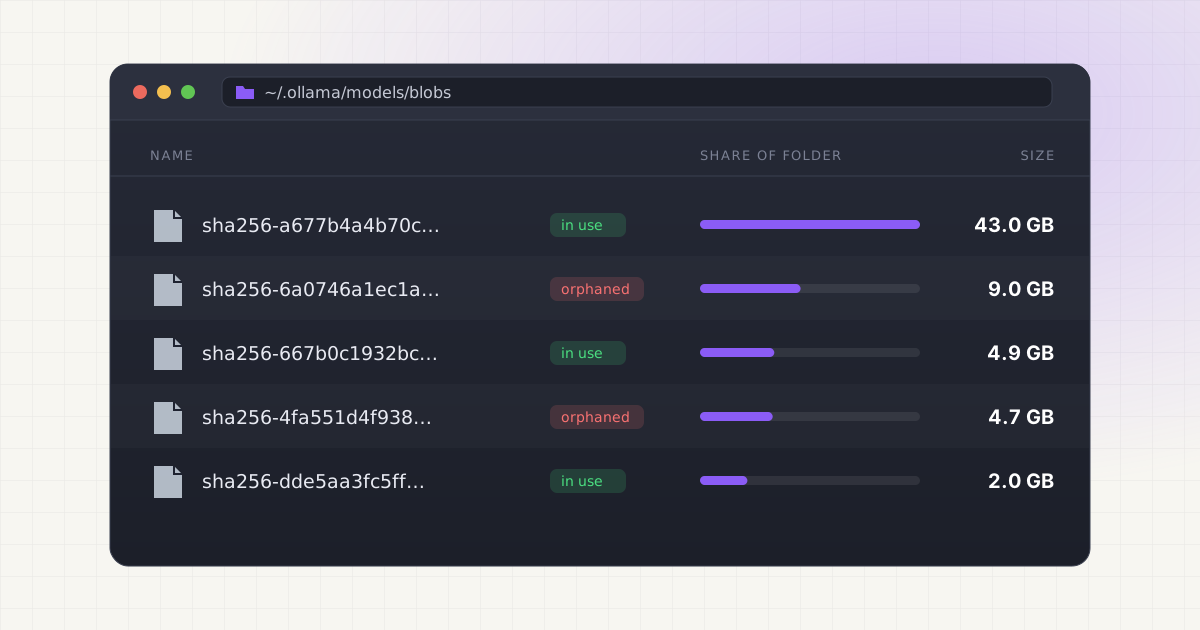
You installed Ollama, pulled a model or two, and ran a few comparisons. Now your Mac's storage indicator is glowing red and you have no idea where the space went. The short answer: local AI models are enormous, they pile up fast, and Ollama makes it trivially easy to download more without ever showing you a running total.
Key takeaways
- A single Llama 3.1 8B model at Ollama's default quantization is 4.9 GB; the 70B version of the same family is 43 GB and the 405B version is 243 GB.
- The same model can exist on disk two or three times if you pull different quantizations (Q4, Q8, fp16 are separate files, not variants of one file).
- Ollama stores everything under
~/.ollama/modelsby default, split into two folders (blobs and manifests) that only make sense together. - Deleting the wrong blob can silently break a model that looks fine in
ollama listuntil you try to run it.
How fast it adds up
Model files are just big. There's no way around it: a modern language model with 8 billion parameters needs several gigabytes even after aggressive compression. Ollama's own library lists Llama 3.1 8B at 4.9 GB, Mistral 7B at 4.4 GB, and Gemma 2 9B at 5.4 GB in their default quantized form. Source Jump up to 70 billion parameters and Llama 3.1 balloons to 43 GB. Go all the way to the 405B flagship and you're looking at 243 GB for one model. Source
Now think about how people actually use Ollama. Nobody pulls one model and stops. You try Llama for coding help, Mistral for speed, Gemma for a second opinion, maybe Qwen because someone on Reddit said it's better at math. Four or five "quick tests" later, you've quietly parked 25 to 40 GB of models you may never open again. Add a single 70B model you pulled once to see if it was worth the RAM, and you've doubled that number in one command.
Same model, different sizes: what quantization actually changes
Here's the part that trips people up. When you type ollama pull llama3.1, you get one specific quantized version, usually Q4_K_M, which is a compressed representation of the model's weights. Pull llama3.1:8b-instruct-q8_0 to compare quality and you don't get a smaller add-on file: you get an entirely separate 8.5 GB blob sitting next to the 4.9 GB one you already had. Grab the fp16 (full precision, unquantized) version and you're adding roughly 16 GB more for what is, to Ollama, functionally "the same model" from a user's point of view.
Quantization itself isn't the enemy here, it's actually what makes local AI feasible on a laptop at all. GGUF, the file format Ollama and most local runtimes use, was introduced by the llama.cpp project in August 2023 specifically to make quantized models portable and self-describing, replacing the older, more brittle GGML format. Source The problem isn't that quantization exists. It's that nothing in Ollama's interface tells you "hey, you now have three copies of essentially the same 8B model taking up 21 GB combined."
Model size by parameter count: a quick reference
If you want a sense of what you're actually committing to before you hit enter on a pull command, here's what real models cost on disk at their default Ollama quantization:
| Model | Parameters | Approx. size on disk |
|---|---|---|
| Qwen2.5 | 0.5B | 0.4 GB |
| Gemma 2 | 2B | 1.6 GB |
| Mistral | 7B | 4.4 GB |
| Qwen2.5 | 7B | 4.7 GB |
| Llama 3.1 | 8B | 4.9 GB |
| Gemma 2 | 9B | 5.4 GB |
| Qwen2.5 | 14B | 9.0 GB |
| Gemma 2 | 27B | 16 GB |
| Qwen2.5 | 32B | 20 GB |
| Llama 3.1 | 70B | 43 GB |
| Qwen2.5 | 72B | 47 GB |
| Llama 3.1 | 405B | 243 GB |
Notice something? Storage roughly scales with parameter count, but not linearly with usefulness. A 27B model isn't three times more useful than a 9B one just because it's three times bigger. Most people never need anything past 8B to 14B for day-to-day use, yet it's incredibly easy to end up with the whole ladder sitting on your SSD from testing.
Want to skip the hidden-folder hunt?
LLM Cleaner scans your Mac for local AI models, caches, indexes, and project memory — then shows what you can review, reveal, export, or safely move to Trash.
Why the same model shows up more than once across tools
Ollama isn't the only thing on your Mac that hoards model weights. If you also use LM Studio, ComfyUI, or pull models directly from Hugging Face for a Python project, each of those tools keeps its own private copy. They don't share a cache with Ollama or with each other, so downloading "the same" Llama or Mistral model in two apps means two full downloads sitting in two different folders. If you've noticed LM Studio's storage climbing independently of Ollama's, that's worth checking separately, since the two rarely overlap on disk even when they overlap in what they can run.
This is also where coding assistants sneak in. Tools like local AI agents and IDE copilots sometimes pull their own small models or embedding caches in the background, adding to a total that has nothing to do with the models you deliberately chose. It's worth understanding how local AI agents contribute to storage growth separately from anything you pulled through Ollama's CLI.
A worked example of how storage compounds
Let's walk through a realistic weekend. You install Ollama and pull Llama 3.1 8B to try it out: 4.9 GB. It's decent, but you've heard Mistral is faster, so you grab that too: 4.4 GB, running total 9.3 GB. A friend recommends Gemma 2 9B for writing tasks: 5.4 GB, now 14.7 GB. Curious how much better the big model really is, you pull Llama 3.1 70B just once to compare: 43 GB. You're now at 57.7 GB, and you haven't even started experimenting with quantization variants or a second tool.
Then, a month later, you decide Q4 quality wasn't quite good enough for one project, so you pull the Q8 version of your favorite 8B model: another 8.5 GB. You install LM Studio to test a model Ollama doesn't have yet, and it downloads its own separate 5 GB copy of something you already have elsewhere. None of this required bad judgment on your part. Each individual pull made sense in the moment. That's exactly why it's so hard to notice until Finder's "About This Mac" storage bar turns orange.
Why you cannot just search for large files
Once you notice the problem, the obvious move is opening Finder or a disk-space analyzer and sorting by file size. You'll find the culprits fast: giant files with names like sha256-3a2b1c... sitting in ~/.ollama/models/blobs. But now what? Ollama doesn't store models as neatly named files. It uses a content-addressable layout borrowed from container registries: the actual storage path splits every model into a manifest (metadata describing which layers make up the model) and one or more blobs (the actual weight data, named by content hash rather than model name).
A single blob might be shared by two different model tags if they happen to use identical weights. Delete the "wrong" blob based on file size alone and you can silently corrupt a model that still shows up fine in ollama list, until the moment you try to run it and it fails or falls back to redownloading. There's no warning dialog for this. Finder has no idea a blob is referenced by a manifest three folders away, so deleting by file size is a genuine gamble, not a cleanup strategy.
The cleanup approach that actually works
Effective Ollama cleanup means treating blobs and manifests as a linked system, not a folder of random large files. That means cross-referencing every blob against every manifest so you know exactly which files belong to which named model, and which ones are orphaned: leftover blobs no longer referenced by anything, usually the debris of a model you deleted with ollama rm weeks ago that didn't fully clean itself up. It also means checking whether you actually need three quantizations of the same 8B model sitting side by side, or whether Q4 was fine all along.
The other half of the picture is seeing your Ollama footprint next to everything else eating your disk: LM Studio's cache, Hugging Face downloads if you use transformers directly, and coding-assistant caches that quietly grow in the background. If you're trying to reclaim space without breaking a working setup, there's a safer way to approach it than deleting anything that looks big.
Not sure what is safe to delete?
LLM Cleaner separates models, rebuildable caches, and project memory so you do not treat everything like junk.
Frequently asked questions
Where does Ollama actually store models on a Mac?
By default, Ollama keeps everything under ~/.ollama/models, split into a manifests folder (small JSON files describing each model) and a blobs folder (the actual multi-gigabyte weight files, named by SHA-256 hash). You can redirect this with the OLLAMA_MODELS environment variable if you want models on an external drive instead.
Can I just delete files in the blobs folder to free up space?
You can, but it's risky. Blobs are named by content hash, not by model name, and a single blob can be referenced by more than one manifest. Deleting based on file size alone can leave a manifest pointing at a file that no longer exists, which breaks the model the next time you try to run it.
Why does the same model take up space twice?
Usually because you pulled two quantizations of it, like Q4_K_M and Q8_0, which Ollama treats as entirely separate files rather than variants of one file. It can also happen because a second tool, like LM Studio or a Hugging Face download, keeps its own independent copy that Ollama has no visibility into.
Does ollama rm fully clean up after itself?
It removes the manifest for that model tag, but it can leave orphaned blobs behind if those blobs aren't referenced anywhere else. Over months of pulling and removing models, those leftovers accumulate quietly, which is why a folder-size check on ~/.ollama often shows more space used than ollama list would suggest.
How much disk space should I budget for testing a few models?
Plan for roughly 5 GB per 7B to 9B model at default quantization, 15 to 20 GB for anything in the 27B to 32B range, and 40 GB or more for a single 70B model. Testing three or four mid-size models plus one large one can easily put you past 60 GB before you've settled on a favorite.