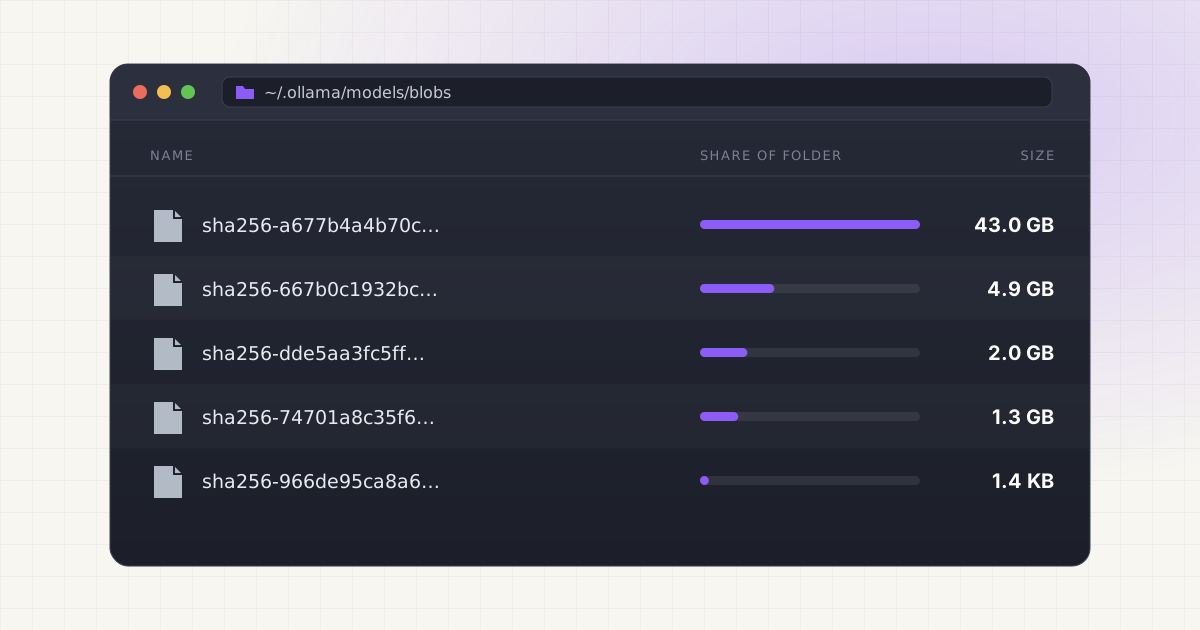
You pulled a model in Ollama. It worked, so you pulled three more to compare them. A few weeks later your Mac is suspiciously low on storage, and Ollama is probably the reason you're not thinking of first.
It should be.
Key takeaways
- Default macOS path is
~/.ollama/models, overridable with theOLLAMA_MODELSenvironment variable. - Model weights live in
blobs/assha256-<hash>files, not by model name. - Ollama's own library lists llama3.1:70b at 43GB and llama3.1:405b at 243GB.
- Orphaned blobs are only auto-pruned when the Ollama server restarts.
The fast answer
On macOS, Ollama stores every model you pull inside ~/.ollama/models, a hidden folder that Finder won't show you unless you press Cmd+Shift+. to reveal hidden files. That default location can be changed with the OLLAMA_MODELS environment variable, which is the officially documented way to move the whole storage directory somewhere else, like an external SSD. Source
Inside that folder, the files aren't named after the models you downloaded. They're named after cryptographic digests. Open it up and you'll see nothing resembling llama3.safetensors. There's no obvious way to look at the folder and know what's safe to delete.
Size adds up fast. Ollama's own model library lists llama3.2:1b at 1.3GB, llama3.1:8b at 4.9GB, and llama3.1:70b at 43GB. Source Pull a handful of models to compare them, which is exactly what most people do when they're evaluating options, and you've quietly committed 60 to 80GB of your SSD to files you may not remember downloading.
Why manual cleanup is harder than it looks
Ollama's storage is split into two parts: a blobs/ directory holding the actual model weights, and a manifests/ directory holding small JSON files that describe each model and point to the blobs it needs. A manifest lists a configuration layer plus a set of additional layers, each one referencing a blob by its SHA-256 digest, its media type, and its size.
Here's the detail that trips people up: a digest written as sha256:3a55b1... inside a manifest becomes a file literally named sha256-3a55b1... on disk, with the colon swapped for a hyphen because macOS and Linux filesystems don't love colons in filenames. Source That's a deliberate design choice, but it means every blob file you see is an anonymous 64-character hex string with no extension and no readable label.
There's also the orphaned blob problem. When you delete a model with ollama rm, Ollama removes the manifest and only deletes the underlying blobs if nothing else references them anymore. If a pull gets interrupted, or a model gets replaced by a newer version, leftover blob files can sit in the folder indefinitely. They don't show up in ollama list because that command reads manifests, not the blobs directory directly. So how would you even know they're there?
Ollama does clean some of this up on its own. Startup pruning of orphaned blobs is controlled by the OLLAMA_NOPRUNE environment variable, which is disabled by default, meaning Ollama does sweep unreferenced blobs every time its server restarts. Source The catch is that most people leave Ollama running for days or weeks at a stretch on a Mac they rarely reboot, so that automatic cleanup barely gets a chance to run.
What makes this riskier than other file cleanup
A few things separate Ollama's storage from a normal Downloads folder purge.
- Blobs are shared between models. Two different tags of the same base model, or two fine-tunes built on the same foundation layer, can point at the exact same blob file. Delete it manually and you break every model that referenced it, not just the one you meant to remove.
- Ollama is often running in the background. If the server is mid-inference or has a model loaded in memory, touching its files directly can produce a model that loads without erroring but behaves oddly, which is a much harder bug to trace than a clean failure.
- There's no built-in size overview.
ollama listshows the logical size of each model, but it won't tell you about orphaned blobs, duplicate downloads across tools, or how much of that 43GB llama3.1:70b pull is actually still referenced by anything you use.
None of this is unique to Ollama, either. If you also run LM Studio or pull directly from Hugging Face, you're managing the same class of problem in LM Studio's own model cache and in Hugging Face's separate storage location, each with its own naming scheme and its own rules about what's safe to touch.
How to actually see what's on disk
Before you delete anything, get real numbers. These are read-only checks, so there's nothing here that can break a model.
ollama listShows every model Ollama knows about, its size, and when it was last modified. This reads manifests, so it won't reveal orphaned blobs.
du -sh ~/.ollama/modelsGives you the true total size of the whole storage directory, blobs and manifests combined. Compare this number to what ollama list adds up to. A meaningful gap between the two usually means orphaned blobs.
du -sh ~/.ollama/models/blobs/* | sort -rh | head -20Lists the twenty largest individual blob files, sorted biggest first. Cross-reference the hash prefixes against what's in ~/.ollama/models/manifests if you want to figure out which model a given blob belongs to.
ollama psShows what's currently loaded into memory right now, with columns for name, size, processor allocation, and how long until it unloads. Source Useful for confirming nothing is actively using a model before you remove it.
Run those four commands and you'll usually know within a minute whether your disk problem is "I have too many models I actually chose to keep" or "something got orphaned and never got cleaned up."
Want to skip the hidden-folder hunt?
LLM Cleaner scans your Mac for local AI models, caches, indexes, and project memory — then shows what you can review, reveal, export, or safely move to Trash.
A worked example
Say you're comparing a few general-purpose models before settling on one for a coding assistant workflow. Here's what that actually costs on disk, based on the exact sizes Ollama's own library publishes for each tag.
| Model | Size on disk | Context window |
|---|---|---|
| llama3.2:1b | 1.3GB | 128K |
| llama3.2:3b | 2.0GB | 128K |
| llama3.1:8b | 4.9GB | 128K |
| llama3.1:70b | 43GB | 128K |
| llama3.1:405b | 243GB | 128K |
Pull the 1b, 3b, and 8b variants to compare quality, then decide you want to test the 70b too, and you've already used roughly 51GB before you've deleted a single thing. Add a second model family into the mix while you're at it and it's not hard to see how a Mac with a 512GB drive starts throwing low-storage warnings within a couple of months of casual experimentation.
This is also why duplicate detection matters more than it sounds like it should. If you've pulled llama3.1:8b through Ollama and also downloaded a similar checkpoint through Hugging Face or LM Studio, you're not looking at one 4.9GB file, you're looking at two or three separate multi-gigabyte copies of functionally the same weights, stored in completely different folders with completely different naming conventions.
How to move Ollama models to an external drive
Most people who go looking for Ollama's model folder want to get it off the internal SSD. There are two ways to do that on a Mac, and both keep your existing models without re-downloading them.
Option 1: point Ollama at a new folder with OLLAMA_MODELS. This is the documented route. On macOS the menu bar app reads environment variables set through launchctl, so the steps are:
- Quit Ollama from the menu bar so nothing is reading the files.
- Copy the whole folder, keeping
blobsandmanifeststogether:rsync -a ~/.ollama/models/ /Volumes/AIDrive/ollama-models/ - Tell Ollama where the models live now:
launchctl setenv OLLAMA_MODELS /Volumes/AIDrive/ollama-models - Reopen Ollama and run
ollama list. Every model should still be there. Only then remove the old copy in~/.ollama/models.
The Ollama FAQ describes this launchctl setenv approach for the macOS app. Source A launchctl variable doesn't survive a reboot, so if you want it permanent, set it from a login item or launch agent. If you run ollama serve from a terminal instead, export the variable in your shell profile.
Option 2: move the folder and leave a symlink. Copy ~/.ollama/models to the external drive, delete the original, and create a symlink in its place with ln -s /Volumes/AIDrive/ollama-models ~/.ollama/models. Ollama follows the link and never needs to know the files moved. This is what LLM Cleaner's Move to Drive feature does for you, one model or many at a time.
Either way, use an APFS or Mac OS Extended formatted drive, and make sure it's connected before Ollama starts. If the drive is missing, Ollama can't see the models and will show an empty list until you plug it back in. For the full delete-instead-of-move walkthrough, see how to delete Ollama models on Mac.
The right approach
Before removing anything from Ollama's storage, you need to see the full picture: which models are present, how large each one actually is on disk, when it was last used, and whether any blobs are orphaned. The commands above get you partway there, but they're manual, and you have to run them every time you want an updated picture.
If you're managing more than a couple of models, or if Ollama is just one of several tools filling up your drive alongside coding assistants and other local AI caches, doing this by hand gets old fast. For a broader look at doing this safely across every tool at once, see our guide on cleaning local AI models without breaking your setup.
Not sure what is safe to delete?
LLM Cleaner separates models, rebuildable caches, and project memory so you do not treat everything like junk.
Frequently asked questions
Can I just delete files inside ~/.ollama/models manually?
You can, but it's risky. Blob files are shared between models, so deleting one that looks unused might actually break a different model that references the same layer. If you go this route, stop the Ollama server first, and cross-check every blob hash against the manifests folder before removing anything.
Does ollama rm actually free up disk space?
Usually, yes. ollama rm deletes a model's manifest and then removes any blob files that nothing else references anymore. If a blob is shared with another model you still have installed, that blob stays on disk until every model using it is removed. That's normal and by design.
Why doesn't ollama list match what du shows for the folder size?
A gap between the two almost always means orphaned blobs: leftover files from interrupted pulls, replaced model versions, or blobs Ollama hasn't pruned yet. Ollama prunes orphaned blobs automatically on server restart unless OLLAMA_NOPRUNE is set, so if you rarely restart the app, that gap can grow for a while.
Can I move my Ollama models to an external drive?
Yes. Stop Ollama, set the OLLAMA_MODELS environment variable to a new path on the external drive, copy the existing blobs and manifests folders there, and restart. The official docs cover setting environment variables per platform, since macOS, Linux, and Windows each handle it differently.
Is it just Ollama, or do other local AI tools do this too?
It's not just Ollama. LM Studio, Hugging Face's cache, ComfyUI, and coding assistants like Cursor or Claude Code all scatter model and cache files across their own hidden directories. If your Mac is filling up and you use more than one of these tools, it's worth reading about why local AI agents fill Mac storage more broadly, since the blob-and-manifest pattern shows up in several of them.