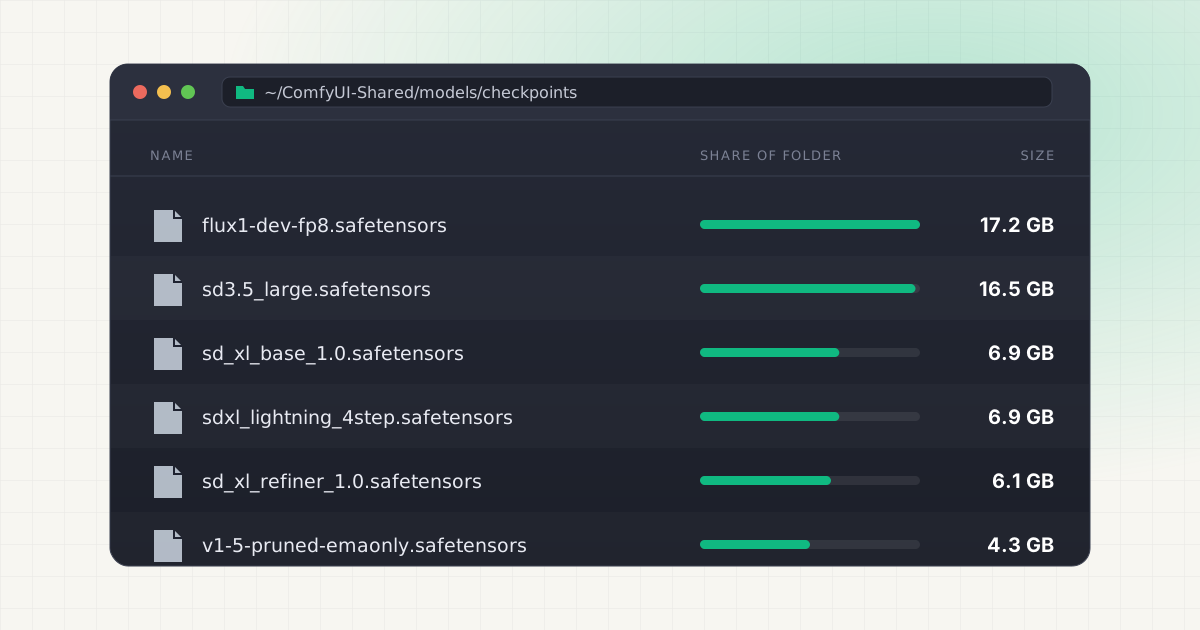
ComfyUI makes it very easy to try things. Someone shares a workflow, it asks for a checkpoint, a LoRA, a VAE, two text encoders and a ControlNet, and the Manager offers to download whatever is missing. You click yes. Do that a dozen times and your Mac's SSD is quietly 100GB lighter.
The good news is that ComfyUI's storage is far easier to understand than most AI tools. Files keep their real names, they sit in plainly named folders, and the app follows symlinks. You just need to know which install you have and where it puts things.
Key takeaways
- A git-clone install keeps models in
ComfyUI/models/. The current Comfy Desktop app uses~/ComfyUI-Shared/models. The older Desktop app defaulted to~/Documents/ComfyUI/models. - The heavy folders are usually
checkpoints,diffusion_models(alsounet), andtext_encoders(alsoclip). - FLUX.1 dev is 23.8GB in its full form on Hugging Face. Its T5-XXL fp16 text encoder adds another 9.8GB.
extra_model_paths.yamllets ComfyUI read models from another folder, including an Automatic1111 or Forge install or an external SSD.- Some custom nodes download their own models outside
models/, and theoutputfolder grows with every image you generate.
Where ComfyUI stores models on a Mac
It depends on how you installed it. There are three common setups on macOS, and each one puts the models folder somewhere different.
| Install type | Models folder | Outputs |
|---|---|---|
| Manual install (git clone) | <wherever you cloned it>/ComfyUI/models/ | ComfyUI/output/ |
| Comfy Desktop (current) | ~/ComfyUI-Shared/models | ~/ComfyUI-Shared/output |
| Legacy ComfyUI Desktop | ~/Documents/ComfyUI/models (the default; you could pick another folder) | ~/Documents/ComfyUI/output |
For a manual install, ComfyUI builds every model path from a models directory inside its own base folder, and puts output, input and temp next to it. Source The README's instruction is still the simplest version of this: "Put your SD checkpoints (the huge ckpt/safetensors files) in: models/checkpoints." Source
The current Comfy Desktop app is a launcher that can manage several ComfyUI installs. Its docs list ~/ComfyUI-Installs for installations and ~/ComfyUI-Shared for the "shared model library, input/output directories", plus settings in ~/Library/Application Support/Comfy Desktop. Source In the app's source, the default shared models directory is ComfyUI-Shared/models and outputs go to ComfyUI-Shared/output. Source Uninstalling the app does not remove any of these folders, so they stay on disk after the app is in the Trash.
If you used the earlier single-install Desktop app, its default install path was a ComfyUI folder in your Documents directory. Source That path is also written into ~/Library/Application Support/ComfyUI/extra_models_config.yaml, which is where the legacy app looks for models. Source Migrating to the new Comfy Desktop does not copy those models. It adds the old folder as a shared directory and leaves the files where they are. Source
Not sure which one you have? Run this. Any line that prints a size is a live models folder.
du -sh ~/ComfyUI/models ~/Documents/ComfyUI/models ~/ComfyUI-Shared/models 2>/dev/nullWhich subfolders get big
ComfyUI sorts models by type, one folder each. Several types accept two folder names, which is why you might see both clip and text_encoders, or both unet and diffusion_models. ComfyUI scans both names for the same loader. Source
| Folder | What goes in it | Typical file size |
|---|---|---|
checkpoints | All-in-one models (UNet + text encoder + VAE) | SD 1.5: 4.3GB. SDXL base: 6.9GB. FLUX dev fp8 checkpoint: 17.2GB |
diffusion_models / unet | Standalone diffusion weights (FLUX, newer models) | FLUX.1 dev or schnell: 23.8GB |
text_encoders / clip | T5, CLIP-L and similar encoders | T5-XXL fp16: 9.8GB. fp8: 4.9GB. CLIP-L: 246MB |
vae | Image decoders | SDXL VAE: 335MB. FLUX ae: 335MB |
loras | Style, character and speed add-ons | From about 20MB to about 400MB each |
controlnet | Pose, depth and edge guidance | SDXL ControlNet Union: 2.5GB |
upscale_models | ESRGAN-style upscalers | RealESRGAN x4plus: 67MB |
embeddings, clip_vision | Textual inversions, image encoders | Usually small, a few hundred MB at most |
The sizes come straight from the Hugging Face file listings: SD 1.5, SDXL base, FLUX dev checkpoint, FLUX.1 dev, FLUX text encoders, SDXL VAE, LCM LoRA SDXL (394MB), FLUX Realism LoRA (22MB), ControlNet Union SDXL, and lllyasviel/Annotators.
FLUX is where most Mac users get surprised. The official ComfyUI example for FLUX dev asks for flux1-dev.safetensors in diffusion_models, the T5 and CLIP-L encoders in text_encoders, and the VAE in vae. Source With the fp16 encoder, that one setup is about 34GB. Add schnell for comparison and you are near 58GB for a single model family.
LoRAs look harmless one at a time. The problem is volume. People collect them by the dozen, and a folder of fifty SDXL LoRAs at a few hundred megabytes each is easily 10GB or more.
Find the biggest files
These commands only read. Swap the path for your own models folder.
du -sh ~/ComfyUI-Shared/models/* | sort -rhSize of each subfolder, largest first. This tells you whether your problem is checkpoints, FLUX weights, or a LoRA habit.
find ~/ComfyUI-Shared/models -type f -size +1G -exec du -h {} + | sort -rh | head -25Every individual file over 1GB, sorted. Most of your disk usage is usually in this list.
du -sh ~/ComfyUI-Shared/output ~/ComfyUI/output ~/Documents/ComfyUI/output 2>/dev/nullHow much your generated images and videos take up. More on that below.
du -sh ~/ComfyUI/custom_nodes/* 2>/dev/null | sort -rh | head -15Custom node folders, largest first. A node that weighs several gigabytes is almost always storing model files inside itself.
Rather see it all in one list?
LLM Cleaner finds ComfyUI checkpoints, LoRAs and VAEs next to your Ollama, LM Studio and Hugging Face models, sorted by size, all on your Mac.
Duplicates with Hugging Face, Automatic1111, Forge and InvokeAI
If ComfyUI is not your first image tool, you probably have the same checkpoint more than once. A 6.9GB SDXL base file is 6.9GB in every folder it sits in. Common overlaps:
- Automatic1111 and Forge keep checkpoints in
models/Stable-diffusion, LoRAs inmodels/Lora, and VAEs inmodels/VAE. That's the folder layout ComfyUI's own example config maps for A1111. Source - Hugging Face cache. Anything you pulled with
diffusersorhuggingface-clisits in~/.cache/huggingface/hubunder hashed blob names. We cover that layout in where Hugging Face stores models on Mac. - InvokeAI manages its own models directory inside its root folder, separate from everything else.
- Multiple ComfyUI installs. A git clone, a legacy Desktop folder in Documents, and a new
~/ComfyUI-Sharedcan all exist at the same time, each with its own copy.
Filenames don't always help. The same weights get renamed, and two files called model.safetensors might be completely different. Comparing sizes is a reasonable first pass. Comparing content is the only way to be sure. LLM Cleaner flags files of 50MB or more that are stored more than once by hashing part of each file's content, so a renamed copy still shows up as a duplicate.
Share one model folder with extra_model_paths.yaml
Deleting duplicates is one fix. Pointing every tool at a single copy is the better one. ComfyUI reads extra model folders from extra_model_paths.yaml in its root directory. The repo ships an example file you rename. Source
cd ~/ComfyUI
cp extra_model_paths.yaml.example extra_model_paths.yaml
To reuse an existing Automatic1111 or Forge install, uncomment the a1111 block and set the base path. This is the syntax from the example file:
a1111:
    base_path: /Users/you/stable-diffusion-webui/
    checkpoints: models/Stable-diffusion
    configs: models/Stable-diffusion
    vae: models/VAE
    loras: |
         models/Lora
         models/LyCORIS
    upscale_models: |
                  models/ESRGAN
                  models/RealESRGAN
                  models/SwinIR
    embeddings: embeddings
    hypernetworks: models/hypernetworks
controlnet: models/ControlNetFor a central library on an external SSD, use a custom block. The is_default: true line tells ComfyUI to list these folders first and use them as the default destination for downloads.
external_ssd:
    base_path: /Volumes/AI-SSD/comfy-models/
    is_default: true
    checkpoints: checkpoints/
    diffusion_models: diffusion_models/
    text_encoders: text_encoders/
    loras: loras/
    vae: vae/
    controlnet: controlnet/
    upscale_models: upscale_models/
Restart ComfyUI after saving. Source You can also pass the file at launch with --extra-model-paths-config, or move the whole models folder with --models-directory. Source
Comfy Desktop is different. You add model folders in the app under the Storage tab, and the folder marked Primary is where new downloads land. Source On the legacy Desktop app, the docs ask you to edit ~/Library/Application Support/ComfyUI/extra_models_config.yaml, keep the generated entries, and back the file up before changing it. Source
Custom nodes that keep their own models
Not every model lives in models/. ComfyUI's docs say it directly: models enabled through community custom nodes can use different paths, so check each node's README. Source
The ControlNet preprocessor pack is a good example. By default, comfyui_controlnet_aux downloads its annotator models to a ./ckpts folder inside its own custom node directory. Its config has a USE_SYMLINKS option for people who already have the same files in ~/.cache/huggingface/hub, and it is off by default. Source The annotator files themselves range from tens of megabytes to 3.7GB for clip_g.pth. Source
Other nodes call huggingface_hub directly, which puts their downloads in the shared Hugging Face cache instead of anywhere near ComfyUI. If you deleted a custom node months ago, its ckpts folder may be gone, but whatever it pulled into the Hugging Face cache is probably still there.
The output folder
Every image you save lands in output, and ComfyUI never cleans it. Single PNGs are small, but batch runs, upscaled images and video workflows add up. Each PNG also embeds the workflow that made it, so the folder is worth skimming before you clear it. You can drag an old image back into ComfyUI to recover its graph.
If you want outputs off the internal drive entirely, launch with --output-directory /Volumes/AI-SSD/comfy-output. Source Comfy Desktop exposes the same thing as Shared Output in its Storage settings. Source
Delete or move to an external SSD?
ComfyUI has no uninstall button for models. The docs say to delete the file from the folder you put it in. Source That is simple, but a few habits keep it safe:
- Delete to the Trash, not with
rm. If a workflow you forgot about needed that VAE, you can put it back in seconds instead of downloading 10GB again. - Quit ComfyUI first, so nothing is mid-load when the file disappears.
- Check shared folders. If Comfy Desktop or
extra_model_paths.yamlpoints several installs at one folder, deleting a file there removes it for all of them. - Start with true duplicates and old experiments. A second copy of SDXL base is safe to drop. The only copy of a LoRA you trained yourself is not.
If you'd rather keep everything but free the internal drive, moving is the better choice. You have two options. The extra_model_paths.yaml approach above is the cleanest for whole folders. For individual files, a symlink works too: move the file to the external drive and leave a link at the original path. ComfyUI walks model folders with followlinks=True, so linked files and folders show up in the loaders as normal. Source
mv ~/ComfyUI/models/diffusion_models/flux1-dev.safetensors /Volumes/AI-SSD/models/
ln -s /Volumes/AI-SSD/models/flux1-dev.safetensors ~/ComfyUI/models/diffusion_models/
The catch with external drives is that the model is only there when the drive is plugged in. If it isn't mounted, the workflow fails with a missing-model error until you reconnect it. For a broader checklist across every AI tool on your Mac, see how to clean local AI models without breaking your setup. The same ideas apply to deleting Ollama models and LM Studio's model folder.
LLM Cleaner handles both paths from one window. It checks the usual ComfyUI locations (~/ComfyUI and ~/Documents/ComfyUI) and reads the extra_model_paths.yaml it finds there, so models you've already pointed elsewhere still show up. Anything outside those places, such as ~/ComfyUI-Shared, can be added as a custom folder. Deleting sends files to the macOS Trash with one-click restore, and moving to an external drive leaves a symlink behind, so your workflows keep loading.
Free up space without breaking your workflows.
Trash-first deletes, symlinked moves to an external drive, and duplicate checks across every AI tool. $19 once, and it runs 100% locally.
Frequently asked questions
Where is the ComfyUI models folder on Mac?
For a manual install, it's ComfyUI/models/ inside the folder you cloned. For the current Comfy Desktop app, it's ~/ComfyUI-Shared/models. For the older Desktop app, it's ~/Documents/ComfyUI/models unless you chose a different folder during setup.
Why is ComfyUI taking up so much space?
Modern image models are large and workflows need several pieces. A FLUX dev setup with the fp16 T5 encoder is around 34GB before any LoRAs. Add older SD 1.5 and SDXL checkpoints, ControlNets, custom-node downloads and months of outputs, and 100GB or more is common.
Is it safe to delete files in ComfyUI's models folder?
Yes, as long as nothing still needs them. ComfyUI has no internal database of models. It just lists what's in the folders. The worst case is a workflow that asks for the file again. Send files to the Trash rather than deleting them permanently, so you can restore one if it turns out you needed it.
Can ComfyUI use models from Automatic1111 or Forge without copying them?
Yes. Uncomment the a1111 section in extra_model_paths.yaml, set base_path to your WebUI folder, and restart ComfyUI. It will list those checkpoints, LoRAs and VAEs alongside its own.
How do I move ComfyUI models to an external drive?
Copy the model folders to the drive, then either add them in extra_model_paths.yaml (or Comfy Desktop's Storage tab), or replace individual files with symlinks. Once ComfyUI can see the external copies, remove the originals. Keep the drive connected whenever you run workflows that use those models.
Does deleting a custom node delete the models it downloaded?
Only the ones stored inside the node's own folder, like comfyui_controlnet_aux/ckpts. Anything the node downloaded into ~/.cache/huggingface/hub stays there until you remove it separately.