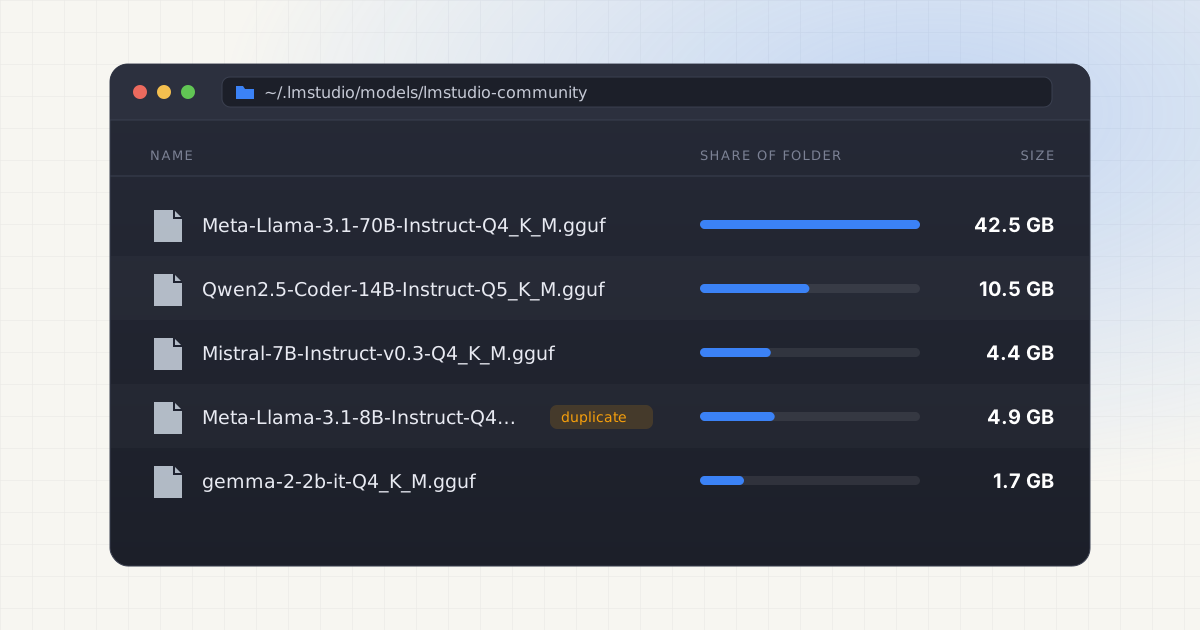
Downloading a model in LM Studio takes about ten seconds and three clicks. Undoing six months of those downloads takes considerably longer, mostly because nothing in the app ever tells you how much you have already pulled down. By the time Finder warns that your startup disk is nearly full, there is usually a folder full of GGUF files you forgot existed.
Key takeaways
- LM Studio stores models at
~/.lmstudio/modelsby default, sorted by publisher and model name. - An 8B GGUF model ranges from about 3 GB (Q2_K) to over 8.5 GB (Q8_0).
- Downloading multiple quantizations of one model to compare quality is the top cause of wasted space.
- LM Studio and Ollama each keep separate copies, so duplicate models go unnoticed.
- Check size, last use, and cross-tool duplicates before deleting anything.
How the storage accumulates
LM Studio stores model files in a directory you can change from Settings, but most people leave it at the default: ~/.lmstudio/models, organized as publisher/model/model-file.gguf. That mirrors the way Hugging Face organizes repositories, which is convenient for LM Studio's engineers but means nothing to you when you are staring at forty folders and no idea which ones matter.
Each model is a GGUF file, a format built for efficient local inference on CPU and GPU alike. Sizes range from around 2 GB for small models to well over 40 GB for the largest ones people run locally. The accumulation pattern is almost always the same: you download a model to try it out, a newer version ships a few weeks later so you grab that too, then you download a different quantization to compare speed against quality, and the original test download never gets removed. Multiply that by every model you have been curious about over the past year and the numbers get large fast.
Nothing about LM Studio's interface nudges you to clean up. The model browser is built for discovery, not housekeeping. There is no running total of disk used shown anywhere prominent, no "last opened" sort in the main view, and no warning before a download starts that you already have three versions of this exact model sitting in the folder next door.
GGUF quantization levels and how big they really get
Quantization is the biggest lever on file size, and it is also the setting people experiment with most. A smaller quantization number means fewer bits per weight, which shrinks the file and speeds up inference at some cost to output quality. For an 8B parameter model, here is what that actually looks like in practice, based on the GGUF quantizations bartowski published for Meta-Llama-3.1-8B-Instruct on Hugging Face:
| Quantization | Approximate size (8B model) | What it trades off |
|---|---|---|
| Q2_K | 3.18 GB | Smallest file, noticeable quality loss |
| Q3_K_M | 4.02 GB | Compact, still a meaningful quality hit |
| Q4_K_M | 4.92 GB | Common default, good speed-to-quality balance |
| Q5_K_M | 5.73 GB | Closer to full quality, larger footprint |
| Q6_K | 6.60 GB | Near full-precision output |
| Q8_0 | 8.54 GB | Very close to original weights, rarely worth it locally |
See the pattern? If you downloaded even three of those quantizations to compare, that single model line is already costing you 13 to 18 GB. Do that for four or five models you have tested over the months and you are looking at 60 to 90 GB gone to files that mostly just sit there. Larger base models make the problem worse in the same proportions. A 70B model at Q4_K_M runs north of 40 GB on its own, so testing two quantizations of it can eat close to 100 GB before you have even decided whether you like the model.
The fix is not to avoid quantization comparisons. It is to actually delete the losers once you have picked a favorite, which sounds obvious until you realize most people never go back and check.
Want to skip the hidden-folder hunt?
LLM Cleaner scans your Mac for local AI models, caches, indexes, and project memory — then shows what you can review, reveal, export, or safely move to Trash.
The duplicate problem between LM Studio and Ollama
LM Studio and Ollama solve overlapping problems, they both run large language models locally, and a lot of developers use both depending on the task. What often goes unnoticed is that the same underlying model can end up downloaded twice under two completely different storage systems. Mistral 7B pulled into Ollama's model store and Mistral 7B downloaded through LM Studio are two entirely separate files on disk. Nothing links them, nothing deduplicates them, and neither app knows the other exists.
This gets worse the more tools you use. If you have also pulled the same weights directly from Hugging Face for a Python script, that cache is a third copy again. Add up Ollama, LM Studio, and a raw Hugging Face cache and it is entirely plausible to have three or four copies of the same 4 to 8 GB model spread across your disk, each one invisible to the tool that did not download it. If Ollama's own storage habits are new to you, this breakdown of why Ollama eats disk space covers the same underlying issue from the other side.
None of this is a bug exactly. Each app is just doing its own thing well. But it means the real total of "AI model storage on this Mac" is never visible from inside any single app, only from looking at the filesystem as a whole.
How to find and audit your LM Studio models
Before deleting anything, it helps to actually see what is there. A few concrete steps:
- Open Finder, press Cmd+Shift+G, and go to
~/.lmstudio/models. If you ever changed the model directory in Settings, check there first instead, since the default path will be empty or outdated. - Use "Get Info" or a disk usage tool on each publisher folder to see actual sizes rather than guessing from file counts.
- Sort by "Date Modified" as a rough proxy for last use. It is not perfect since opening a chat with a model does not always touch the file, but a model untouched for eight months is a reasonable deletion candidate.
- Check
~/.ollama/modelsand any Hugging Face cache directories for the same model names before assuming a file is unique.
Doing this by hand for a handful of models is manageable. Doing it across five tools and forty model folders is where most people give up and just leave everything in place, which is exactly how the problem compounds year over year.
Custom model directories
LM Studio lets you point the model directory at a different location entirely, useful if you want to keep large files on an external drive rather than your internal SSD. The setting is straightforward to change. What is less obvious is what happens to the models you already had.
Switching the directory does not move existing files. It just tells LM Studio where to look going forward. If you have ever changed this setting, there is a real chance you have models sitting in the old default location that LM Studio no longer shows you in its UI at all, because it is only looking at the new path. Those orphaned files still take up space. They just do not show up anywhere you would think to check.
What to do before deleting
The safest approach is to get the full picture first: what model files exist, how large each one is, when it was last touched, and whether the same model already lives in another tool's storage under a different path. Deleting a GGUF file that turns out to be the only copy of a model you use weekly is a bad afternoon. Deleting three redundant quantizations of a model you tested once in March is just good housekeeping.
If you are managing storage across multiple AI tools rather than just LM Studio, it is worth reading about how to clean up local AI models without breaking your existing setup, since removing the wrong file can leave a tool pointing at a symlink or config entry that no longer resolves.
Not sure what is safe to delete?
LLM Cleaner separates models, rebuildable caches, and project memory so you do not treat everything like junk.
Frequently asked questions
Where does LM Studio store models on a Mac?
By default, LM Studio saves downloaded models to ~/.lmstudio/models, organized in a publisher/model/file.gguf structure that mirrors Hugging Face repository layout. You can change this location in Settings under the Model Directory field, which is useful for moving large files to an external drive.
How much space does one 8B model actually use?
It depends heavily on quantization. A Q4_K_M version of an 8B model runs close to 4.9 GB, while a Q8_0 version of the same model is around 8.5 GB. Downloading several quantizations of the same model to compare quality can easily add up to 15 to 20 GB for what is functionally one model.
Can I safely delete old quantizations I am not using?
Yes, as long as you keep at least one working copy of the model you actually use. Once you have picked your preferred quantization for a given model, the others are typically just leftovers from testing and can be removed without affecting anything else in LM Studio.
Does changing the model directory move my existing files?
No. Pointing LM Studio at a new model directory only changes where it looks going forward. Files already downloaded to the old location stay exactly where they were, invisible to the app's model list, and continue taking up disk space until you find and remove them manually.
Is it safe to delete the entire .lmstudio folder?
Deleting the whole folder removes every downloaded model along with any settings stored there, so LM Studio effectively starts fresh on next launch. It will not break the app, but you will need to redownload anything you still want to use, so it is worth checking which models you actually need first.