Whisper is one of those tools people install once, run on a podcast or a meeting recording, and then forget about. The transcript gets used. The model file stays on disk.
The tricky part is that "Whisper" isn't one program. On a Mac it can arrive through the original Python package, through whisper.cpp, through faster-whisper or MLX, or bundled inside a transcription app. Each one downloads its own copy of the model, in its own format, into its own folder.
Key takeaways
- The openai-whisper Python package saves models to
~/.cache/whisperas.ptfiles, unlessXDG_CACHE_HOMEordownload_rootpoints somewhere else. - whisper.cpp keeps
ggml-*.binfiles in themodels/folder of wherever you cloned the repo. - faster-whisper, WhisperX and mlx-whisper download through the Hugging Face cache at
~/.cache/huggingface/hub. - large-v3 is about 3.1 GB in every format. Keep it in three formats and that's over 9 GB for one model.
- All of these files re-download on demand, so deleting them is safe as long as you're okay waiting for the next download.
The fast answer: where each Whisper tool stores models
Find the row that matches how you installed Whisper. If you've tried more than one, check every row that applies.
| How you run Whisper | Default model location on macOS | File format |
|---|---|---|
| openai-whisper (pip) | ~/.cache/whisper | large-v3.pt, small.pt, etc. |
| whisper.cpp | <your clone>/models/ | ggml-large-v3.bin, etc. |
| faster-whisper / WhisperX | ~/.cache/huggingface/hub/models--Systran--faster-whisper-* | CTranslate2 model.bin |
| mlx-whisper | ~/.cache/huggingface/hub/models--mlx-community--whisper-* | weights.safetensors or weights.npz |
| MacWhisper (direct download) | ~/Library/Application Support/MacWhisper | App-managed |
| Whisper Transcription (App Store) | ~/Library/Containers/com.goodsnooze.MacWhisper/Data/Library/Application Support/MacWhisper | App-managed |
| Buzz | ~/Library/Caches/Buzz | Depends on the engine you pick |
The rest of this guide explains each one, with sources, and then covers how to find stray copies and clear them without breaking anything.
openai-whisper: ~/.cache/whisper
If you ran pip install openai-whisper and then something like whisper meeting.m4a --model large, the model went into ~/.cache/whisper. The loader builds that path from the XDG_CACHE_HOME environment variable if it's set, and falls back to ~/.cache otherwise, then appends whisper. Source
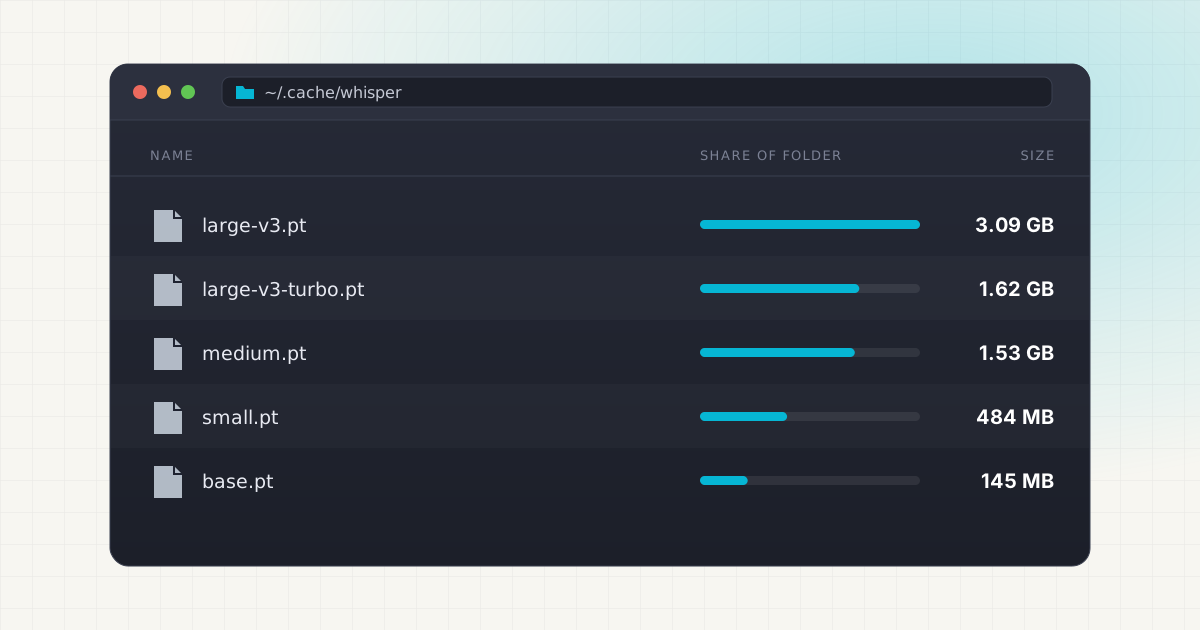
The files are named plainly: tiny.pt, base.en.pt, medium.pt, large-v3.pt, large-v3-turbo.pt. Asking for large downloads large-v3.pt, and asking for turbo downloads large-v3-turbo.pt, since both names point at the same URL in the package's model list. If you've used Whisper since before large-v3 existed, you may also have large-v1.pt and large-v2.pt sitting there at about 3.1 GB each.
You can change the location per run. In Python, whisper.load_model("large", download_root="/Volumes/External/whisper") does it. On the command line, the flag is --model_dir, which the help text describes as "the path to save model files; uses ~/.cache/whisper by default". Source
One detail that makes cleanup safe: before using a cached file, Whisper checks its SHA-256 against the hash in the download URL. If the file is missing or doesn't match, it downloads it again. So deleting a .pt file never leaves Whisper in a broken state. The worst case is a one-time re-download.
whisper.cpp: ggml files in the repo's models folder
whisper.cpp is the C/C++ port that a lot of Mac users prefer because it runs well on Apple Silicon. It can't read the PyTorch .pt files, so it uses its own converted ggml format. The usual way to get a model is the bundled script:
sh ./models/download-ggml-model.sh large-v3That saves models/ggml-large-v3.bin inside your clone of the repo. Source There's no global cache. If you cloned whisper.cpp into ~/whisper.cpp, the models are in ~/whisper.cpp/models. If you cloned it twice, say once in Downloads to try it and once in a projects folder, you probably have two sets of models.
Two extras can add to the folder. Quantized variants such as ggml-large-v3-q5_0.bin are smaller copies of the same model, and the Core ML build produces ggml-*-encoder.mlmodelc folders next to the .bin files. Source
faster-whisper, WhisperX and mlx-whisper: the Hugging Face cache
faster-whisper uses CTranslate2-converted models hosted on Hugging Face. When you ask for large-v3, it maps that name to the Systran/faster-whisper-large-v3 repo, and turbo maps to mobiuslabsgmbh/faster-whisper-large-v3-turbo. It then calls huggingface_hub.snapshot_download. Source Unless you pass download_root, that means the standard Hugging Face cache, which defaults to ~/.cache/huggingface/hub and moves if you set HF_HOME or HF_HUB_CACHE. Source
WhisperX runs on top of faster-whisper, so its transcription models land in the same place. Its README shows the same download_root option for changing that. Source
mlx-whisper, Apple's MLX port, works the same way. Its transcribe function takes a path_or_hf_repo argument that defaults to mlx-community/whisper-turbo, and anything you name there comes from the Hugging Face cache. Source
Inside the cache, folders are named like models--Systran--faster-whisper-large-v3, and the real weights are hash-named files in blobs/. We cover that layout in detail in where Hugging Face models are stored on Mac.
Not sure how many Whisper copies you have?
LLM Cleaner scans ~/.cache/whisper, whisper.cpp models and the Hugging Face cache in one pass and lists every file by size.
Mac apps: MacWhisper, Buzz, Superwhisper and others
Desktop apps manage their own models and usually keep them inside Application Support or an App Store container.
- MacWhisper (direct download) keeps its data, including "downloaded speech-to-text models used by the app", in
~/Library/Application Support/MacWhisper. The App Store version, Whisper Transcription, is sandboxed, so the same folder lives at~/Library/Containers/com.goodsnooze.MacWhisper/Data/Library/Application Support/MacWhisper. Source - Buzz stores models in
~/Library/Caches/Buzzon macOS. You can also open the folder from Help → Preferences → Models → Show file location. Source - Superwhisper keeps its configuration in
~/superwhisperby default (older installs used~/Documents/superwhisper), and itsmodelssubfolder holds configuration for custom models. You download and remove the models themselves from Settings → Models library. Source
For other apps, like Aiko or a dictation tool you tried once, we couldn't find a documented path. Nearly all of them follow the same pattern, though. Check the two places macOS apps are supposed to use:
du -sh ~/Library/Application\ Support/* 2>/dev/null | sort -rh | head -15
du -sh ~/Library/Containers/*/Data/Library/Application\ Support 2>/dev/null | sort -rh | head -15
An unfamiliar folder that's several gigabytes, belonging to a transcription app, is almost certainly models. Look for a remove-model button in the app's settings before deleting anything by hand. That keeps the app's own records in sync.
How big each Whisper model is
Parameter counts come from the openai/whisper README. File sizes are the exact download sizes of the official files, shown in decimal units the way Finder reports them. The whisper.cpp README lists the same ggml files in binary units, for example 2.9 GiB for large-v3, which is the same size written differently. Source Source
| Model | Parameters | openai-whisper .pt | whisper.cpp ggml .bin |
|---|---|---|---|
| tiny | 39 M | 75.6 MB | 77.7 MB |
| base | 74 M | 145 MB | 148 MB |
| small | 244 M | 484 MB | 488 MB |
| medium | 769 M | 1.53 GB | 1.53 GB |
| large-v3 | 1,550 M | 3.09 GB | 3.10 GB |
| large-v3-turbo | 809 M | 1.62 GB | 1.62 GB |
The English-only .en variants are almost the same size as their multilingual siblings. Quantization is the one thing that makes a real difference: whisper.cpp's ggml-large-v3-turbo-q5_0.bin is 574 MB, roughly a third of the full turbo file.
The duplicate problem: one model, three formats
Here's how Whisper quietly eats 10 GB. You try the Python package with --model large, read that whisper.cpp is faster on a Mac, download ggml-large-v3.bin, then try WhisperX for speaker labels. Now you have:
~/.cache/whisper/large-v3.pt: 3.09 GB~/whisper.cpp/models/ggml-large-v3.bin: 3.10 GB- The
model.binblob fromSystran/faster-whisper-large-v3in the Hugging Face cache: 3.09 GB Source
That's about 9.3 GB for one set of weights. Add an MLX copy, like the 1.61 GB weights.safetensors in mlx-community/whisper-large-v3-turbo, and a GUI app with its own large model, and it keeps growing. Source
These files are not byte-identical, because each format stores the weights differently. A checksum or content-hash duplicate finder won't match them. You have to spot them by model name and size, and decide which runtime you actually use. True byte-for-byte duplicates do happen too, usually when the same ggml-*.bin gets copied into two app folders or two whisper.cpp clones.
Find every Whisper model on your Mac
These commands are read-only. Run them before you delete anything.
du -sh ~/.cache/whisper 2>/dev/null
ls -lh ~/.cache/whisper
Shows the openai-whisper cache and each .pt file in it.
find ~ -name "ggml-*.bin" -size +50M 2>/dev/nullFinds every whisper.cpp model in your home folder, including ones inside app folders and forgotten clones. The -size +50M filter skips the tiny empty test files that ship in the repo.
du -sh ~/.cache/huggingface/hub/models--*whisper* 2>/dev/null | sort -rhLists every Whisper-related repo in the Hugging Face cache: faster-whisper, MLX, distil-whisper and the original openai/whisper-* Transformers checkpoints.
find ~ \( -name "*.pt" -o -name "*.bin" -o -name "*.safetensors" \) -path "*hisper*" -size +50M 2>/dev/nullA broader sweep for any large model file with "whisper" or "Whisper" somewhere in its path. It takes a minute on a big home folder.
Deleting Whisper models safely
Whisper models are among the safest AI files to remove, because every tool covered here re-downloads a missing model the next time you ask for it. You aren't losing anything you can't get back. You're only trading disk space for a future download.
A few habits keep it painless:
- Quit the app first. Don't delete a model while a transcription is running.
- Use the tool's own removal when it has one. For the Hugging Face cache,
hf cache rm model/Systran/faster-whisper-large-v3removes the repo and cleans up its blobs properly, andhf cache pruneclears interrupted downloads. Source For MacWhisper, Buzz and Superwhisper, use the model list in settings. - For plain files, move them to Trash instead of using
rm..ptand ggml files are self-contained, so you can drag them out of~/.cache/whisperormodels/in Finder (Cmd+Shift+G to type a hidden path, Cmd+Shift+. to show hidden files). If a script breaks, put the file back. - Keep one format of the model you use. If whisper.cpp is your daily driver, the
.ptand CTranslate2 copies of large-v3 are likely dead weight.
The same logic applies to every local AI tool. Our guide on cleaning local AI models without breaking your setup goes through it more broadly.
Moving Whisper models to an external drive
If you want to keep models but not on your internal SSD, each tool has a supported way to point elsewhere:
- openai-whisper:
--model_diron the CLI ordownload_rootin Python. SettingXDG_CACHE_HOMEalso works, but it moves other tools' caches too. - whisper.cpp: keep the
.binfiles anywhere and pass the full path with-m /Volumes/External/whisper/ggml-large-v3.bin. - faster-whisper and WhisperX:
download_root, or setHF_HOMEto move the whole Hugging Face cache.
The alternative is a symlink: move the folder to the external drive and leave a link at the old path, so no tool needs reconfiguring. It works well for ~/.cache/whisper and whisper.cpp's models/ folder. Just keep the drive connected when you transcribe. If the link points at an unmounted volume, the tool will treat the model as missing and try to download it again.
LLM Cleaner does that move for you. It copies the files to a drive you choose, leaves a symlink behind, and also scans ~/.cache/whisper, a ~/whisper.cpp/models clone and the Hugging Face cache in one pass. App folders like MacWhisper's can be added as custom scan locations. It doesn't replace the judgment call about which format you actually use, but it puts all the copies in one list with sizes next to each other.
Clear Whisper models without the guesswork.
Everything goes to the macOS Trash first, so restoring a model you still needed takes one click.
Frequently asked questions
Where are Whisper models stored on Mac by default?
For the openai-whisper Python package, in ~/.cache/whisper. For whisper.cpp, in the models/ folder of your clone. For faster-whisper, WhisperX and mlx-whisper, in ~/.cache/huggingface/hub. GUI apps like MacWhisper and Buzz use their own folders under ~/Library.
Is it safe to delete ~/.cache/whisper?
Yes. It only holds downloaded model files. Whisper verifies each file's checksum before loading it and downloads it again if it's missing, so the next run with that model just takes longer while it re-downloads.
Why can't I see the .cache folder in Finder?
Folders starting with a dot are hidden on macOS. Press Cmd+Shift+. in a Finder window to show them, or use Go → Go to Folder (Cmd+Shift+G) and type ~/.cache/whisper.
Can whisper.cpp use the .pt files I already downloaded?
Not directly. whisper.cpp needs ggml files. It does include a convert-pt-to-ggml.py script that converts a .pt file from ~/.cache/whisper, after which you can delete the original if you no longer use the Python package. Source
Which Whisper model should I keep if I'm short on space?
For most people, large-v3-turbo. It's about half the size of large-v3, and OpenAI describes it as an optimized large-v3 with faster transcription and minimal accuracy loss. One catch: it isn't trained for translation, so keep a multilingual model like medium or large-v3 if you translate audio to English. Source
Do other AI tools fill up disk space the same way?
Yes, often more. Ollama and image tools store much larger files. See how to delete Ollama models on Mac and ComfyUI models and disk space on Mac for those.