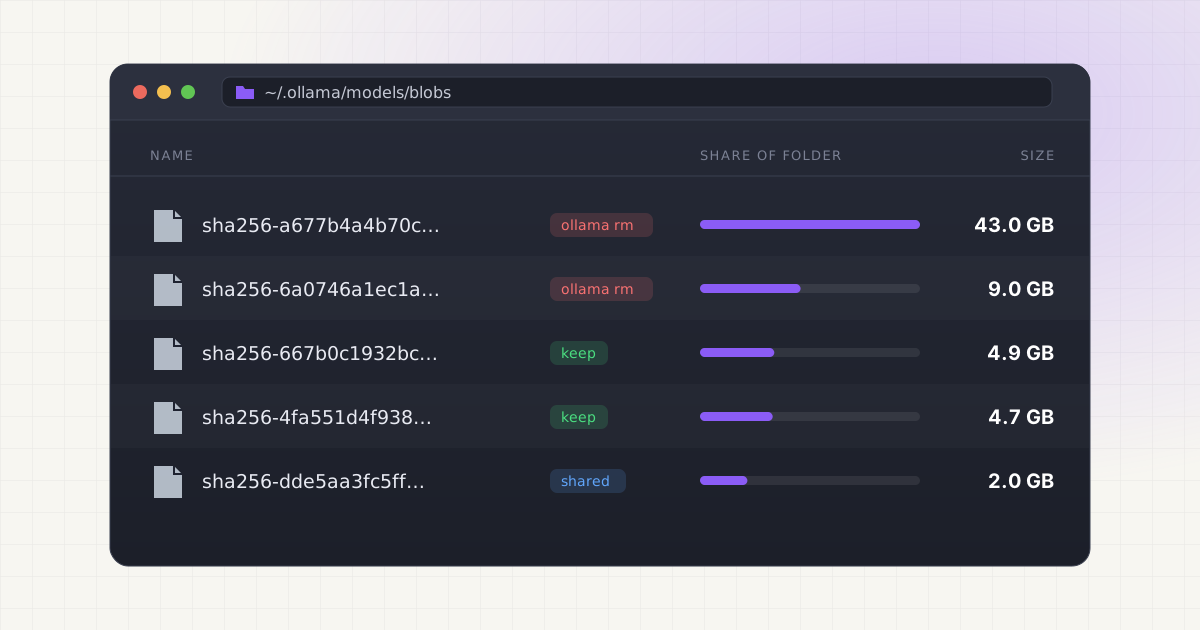
You pulled a 70B model to see if it was really that much better than the 8B one. It wasn't, at least not on your laptop. Now it's sitting in a hidden folder eating 43GB, and you want it gone without breaking the models you actually use.
The good news is that Ollama ships its own delete command, and it's the safest way to do this. The less good news is that a few Mac-specific details decide whether the space actually comes back.
Key takeaways
- Run
ollama listto get the exact model name, thenollama rm <model>to delete it. ollama rmaccepts several names at once and unloads a running model before deleting it.- Blobs shared with another installed model stay on disk. That's by design, not a bug.
- Orphaned blobs get pruned when the Ollama server starts, unless
OLLAMA_NOPRUNEis set. - Files removed by
ollama rmare deleted outright. They don't go to the macOS Trash.
The direct answer: ollama rm
Open Terminal and list what you have installed:
ollama list(ollama ls is the same command.) Copy the name exactly as it appears in the NAME column, including the tag after the colon, then remove it:
ollama rm llama3.1:70bOllama prints deleted 'llama3.1:70b' and you're done. That's the documented way to remove a model. Source
Two details are worth knowing before you run it. First, the command talks to the Ollama server rather than touching files itself. On a Mac, if the server isn't running, the CLI tries to launch the Ollama app first. Second, before deleting, it asks the server to unload the model from memory, so you don't need to stop a running model by hand. Source If you want to check anyway, ollama ps shows what's loaded and ollama stop <model> unloads it. Source
What ollama rm actually deletes
Ollama stores each model as a small manifest file plus a set of blob files named by their SHA-256 digest. If that layout is new to you, our guide on where Ollama stores models on Mac walks through it.
When you delete a model, the server removes its manifest, then goes through every blob that manifest referenced. Any blob that another installed manifest still uses is skipped. Everything else gets removed from disk. Source
This is why deleting a model sometimes frees far less space than ollama list suggested. A few common cases:
- Tag aliases. On Ollama's library,
llama3.2:latestandllama3.2:3bare both listed at 2.0GB. Source If you pulled both names, they point to the same weights. Removing one frees almost nothing until you remove the other. - Copies. A model created with
ollama cp, or a custom model built from a Modelfile on top of a base model, reuses the base model's weight blob. - Shared layers. Small layers like licenses and templates are often identical across tags of the same family.
One more thing: Ollama deletes these files directly. There's no undo, and nothing lands in the Trash. If you might want a model back, the only recovery is pulling it again.
Deleting several models at once
ollama rm takes one or more model names, so you can clear a batch in one line: Source
ollama rm llama3.1:70b qwen2.5-coder:14b llama3.2:1bTo remove every model Ollama knows about, pipe the list into it. This skips the header row and passes each name along:
ollama list | awk 'NR>1 {print $1}' | xargs ollama rmRun ollama list on its own first and read it. That one-liner doesn't ask for confirmation.
Here's what a typical cleanup looks like using sizes from Ollama's own library pages:
| Model | Listed size | Keep or delete? |
|---|---|---|
| llama3.1:70b | 43GB | Delete if your Mac can't run it comfortably |
| llama3.1:8b-instruct-fp16 | 16GB | Delete if you also have the default 4.9GB build |
| qwen2.5-coder:14b | 9.0GB | Keep one coder size, not three |
| llama3.1:8b | 4.9GB | Keep if it's your daily driver |
| qwen2.5-coder:7b | 4.7GB | Keep or delete, depending on the above |
Sources: llama3.1 tags, qwen2.5-coder tags
Deleting just the first two rows gets you back roughly 59GB.
Check that the space actually came back
Don't trust the "deleted" message alone. Measure the folder before and after:
du -sh ~/.ollama/modelsThen add up the SIZE column from ollama list. If the folder is meaningfully bigger than the total of your remaining models, you have orphaned blobs: leftovers from interrupted pulls or older versions of a tag. To see the biggest individual files:
du -sh ~/.ollama/models/blobs/* | sort -rh | head -10macOS can also be slow to update the free-space number in Finder and System Settings. If du shows the folder shrank, the files are gone even if "About This Mac" hasn't caught up yet.
Orphaned blobs and OLLAMA_NOPRUNE
Ollama has a built-in cleanup for orphans. Each time the server starts, it scans for blobs and manifests that nothing references and deletes them. Setting OLLAMA_NOPRUNE turns that off. Source The variable is described in Ollama's config as "Do not prune model blobs on startup." Source The same setting also stops Ollama from removing old layers when you re-pull a tag that changed upstream. Source
So the fix for most orphan problems is simple: quit Ollama from the menu bar and open it again (or restart the brew service, below), then re-run du. If you set OLLAMA_NOPRUNE at some point and forgot, check with:
launchctl getenv OLLAMA_NOPRUNEIf it prints anything, unset it with launchctl unsetenv OLLAMA_NOPRUNE and restart Ollama. There's a longer explanation of where this extra space comes from in why Ollama takes up so much disk space.
Want an undo button for model cleanup?
LLM Cleaner moves Ollama models to the macOS Trash first, keeps them visible with an "In Trash" badge, and restores them in one click.
Menu bar app vs. Homebrew service
How you installed Ollama changes how you restart it, and that matters for pruning and for custom paths.
Ollama.app (the download from ollama.com, or brew install --cask ollama-app). The app runs the server in the background and shows a menu bar icon. Quit from that icon and reopen the app to restart the server. Source
Homebrew formula (brew install ollama). There's no app. The server runs either in a Terminal window via ollama serve or as a background service started with brew services start ollama. Source Restart it with:
brew services restart ollamaEither way, ollama rm works the same. It just needs a running server to talk to.
Models stored under a custom OLLAMA_MODELS path
If you moved your models with the OLLAMA_MODELS environment variable, ~/.ollama/models may be nearly empty and the real files live somewhere else, often an external drive. On a Mac, Ollama's docs say to set that variable with launchctl setenv and then restart the app. Source
The catch: ollama rm deletes from whatever folder the server is using, not whatever your shell has set. If the two disagree, you'll get "model not found" for a model you can see on disk. To find the folder the server really uses, look for the server config line it logs at startup, which includes OLLAMA_MODELS: Source
grep OLLAMA_MODELS ~/.ollama/logs/server.log | tail -1That log path is for the app. Source For the Homebrew service, the log is at $(brew --prefix)/var/log/ollama.log. Note that the Homebrew service definition only sets a couple of performance variables of its own, so a custom path exported in your .zshrc won't reach it. Source Once you know the path, measure it the same way: du -sh /Volumes/YourDrive/ollama-models.
Why deleting blob files by hand is risky
It's tempting to open ~/.ollama/models/blobs in Finder, sort by size, and drag the biggest file to the Trash. Please don't, at least not while Ollama is running and not without checking manifests first.
- Blob names are digests, not model names. The 4.9GB file you think belongs to an old model might be the one your current model uses.
- Shared blobs break every model that references them, not just the one you meant to remove. Those models still appear in
ollama listand then fail when you run them. - Deleting a blob without its manifest leaves a dangling manifest. Deleting a manifest without its blobs leaves orphans that only disappear on the next server start.
If something does break, ollama pull <model> re-downloads whatever is missing. That costs bandwidth and time but nothing else. The broader version of this advice, for every AI tool on your Mac, is in how to clean local AI models without breaking your setup.
Removing all models and uninstalling Ollama completely
If you're done with Ollama entirely, quit it from the menu bar first. Ollama's macOS docs list these locations to remove: Source
rm -rf /Applications/Ollama.app
sudo rm /usr/local/bin/ollama
rm -rf ~/Library/Application\ Support/Ollama
rm -rf ~/Library/Saved\ Application\ State/com.electron.ollama.savedState
rm -rf ~/Library/Caches/com.electron.ollama/
rm -rf ~/Library/Caches/ollama
rm -rf ~/Library/WebKit/com.electron.ollama
rm -rf ~/.ollama
/usr/local/bin/ollama is the CLI link the app offers to create the first time it runs. Source ~/.ollama is the one that holds your models, so it's the line that frees the space. If you used a custom OLLAMA_MODELS folder, delete that too, and clear the variable with launchctl unsetenv OLLAMA_MODELS.
If you installed with Homebrew, use Homebrew instead:
brew services stop ollama
brew uninstall ollama
For the cask, brew uninstall --zap --cask ollama-app also moves ~/.ollama and the app's Library folders to the Trash. Source Ollama's own uninstall list doesn't include a LaunchAgent, but it's worth a quick check for leftovers: ls ~/Library/LaunchAgents | grep -i ollama. A file named homebrew.mxcl.ollama.plist there means a brew service is still registered.
Move instead of delete
Sometimes you don't want a model gone, you just want it off your internal SSD. Two options:
- Move all of Ollama's storage. Quit Ollama, copy the
modelsfolder to an external drive, setOLLAMA_MODELSto the new path withlaunchctl setenv, and restart the app. Source Models won't load when the drive is unplugged. - Move specific large files and leave a symlink. This keeps Ollama's paths intact while the bytes live elsewhere. It's fiddly by hand because you need to know which blob belongs to which model.
The same thinking applies to other tools. LM Studio and Hugging Face keep their own copies in their own folders, so check LM Studio's model folder and Hugging Face's cache on Mac before assuming Ollama is the only culprit.
This is the part LLM Cleaner was built for. It reads Ollama's manifests so blobs show up under real model names, flags identical model files stored twice (same size and a matching content fingerprint), and either moves a model to an external drive with a symlink left behind or sends it to the Trash, where you can restore it. Permanent delete needs a second confirmation. Everything runs locally.
See every local model by name, not by hash.
One scan covers Ollama, LM Studio, Hugging Face, ComfyUI, Whisper and AI coding caches. One-time $19.
Frequently asked questions
How do I delete an Ollama model on Mac?
Run ollama list to see the exact name, then ollama rm <name>, for example ollama rm llama3.1:70b. Ollama removes the model's manifest and any blob files no other model uses.
Why didn't ollama rm free any space?
Usually because another installed tag, copy or custom model still references the same weights. Check ollama list for aliases like :latest next to a sized tag. If nothing else matches, restart Ollama so it prunes orphaned blobs, then measure with du -sh ~/.ollama/models.
Does ollama rm move models to the Trash?
No. It deletes files directly, so there's no restore. To get a model back you need to pull it again. Tools like LLM Cleaner use the macOS Trash instead if you want a safety net.
How do I delete all Ollama models at once?
Use ollama list | awk 'NR>1 {print $1}' | xargs ollama rm, or delete the whole ~/.ollama/models folder after quitting Ollama. The second option also removes orphans in one go.
Is it safe to delete the ~/.ollama folder?
Yes, if you want to remove every model. Quit Ollama first. You'll lose all downloaded models plus the configuration and logs Ollama keeps there. Ollama recreates the folder the next time it runs.
I get "model not found" but the files are on disk. Why?
The server is probably using a different models folder than you think, usually because of an OLLAMA_MODELS setting. Check the startup line in ~/.ollama/logs/server.log to see which path the server loaded.