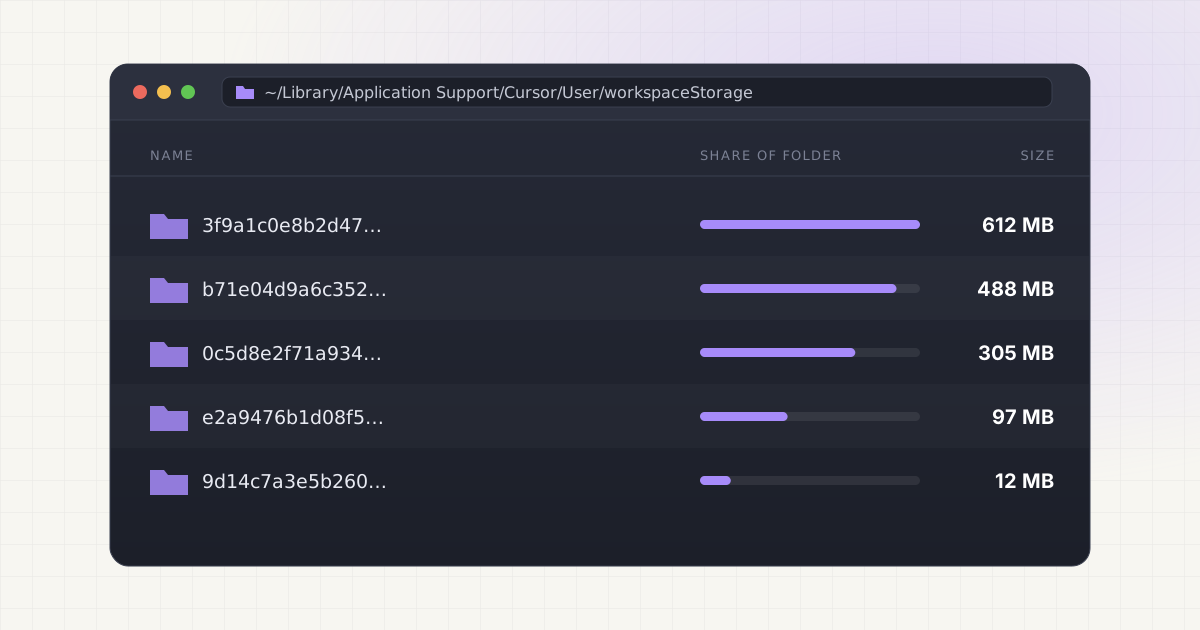
Open Finder, head to ~/Library/Application Support/Cursor/User/workspaceStorage, and count the folders. If you have used Cursor for more than a few months, the number will not match the number of projects you actually work on. It will be higher, sometimes a lot higher, because Cursor keeps a folder for every project it has ever opened, not just the ones you touch today.
Key takeaways
- Cursor creates a hashed workspaceStorage subfolder for every project opened, and never removes it automatically.
- The biggest space users are
.packfiles that hold local edit history, not the AI index itself. - Codebase index embeddings live in Cursor's cloud, not on your disk.
- You can safely delete storage for closed projects, but you lose local checkpoint history for that workspace.
What Cursor stores locally
AI-powered editors like Cursor need to understand your codebase to give useful suggestions, and that understanding comes with overhead. Every workspace you open gets its own subfolder under User/workspaceStorage, named with a hash rather than your project name. Inside, you will typically find a few things: a state.vscdb SQLite database that holds editor layout, recent files, and workspace settings; one or more .pack files, which are Git-style packfiles that store local edit history, undo state, and the snapshots behind Cursor's "Restore Checkpoint" feature; and cached data from any extensions active in that workspace.
Codebase indexing works a bit differently than most people assume. When indexing is on, Cursor computes a Merkle tree of file hashes for the folder you opened, so it only needs to re-walk the branches that changed rather than rescanning everything. According to Cursor's own engineering posts, the actual embeddings and their metadata (file paths, line ranges) are stored in a remote vector database, not on your Mac. Your source code itself is never uploaded or stored on Cursor's servers. You can also add a .cursorignore file, written in the same syntax as .gitignore, to keep build artifacts, dependencies, and large data files out of the index entirely.
So the index isn't really what fills up your disk. It's the local edit history and checkpoint packfiles sitting quietly in workspaceStorage that do the damage, and they keep growing every time you reopen a project and keep editing.
Where exactly the files live
If you want to see this for yourself before deleting anything, a few terminal commands will show you what is actually taking up space. Quit Cursor first so nothing is locked, then run:
du -sh ~/Library/Application\ Support/Cursor/User/workspaceStorage/* | sort -rh | head -20That lists every workspace folder sorted by size, largest first. To see how many workspace entries Cursor has accumulated in total:
ls ~/Library/Application\ Support/Cursor/User/workspaceStorage | wc -lBecause folders are named by hash, not by project, you will not immediately know which one is which. You can decode a hash back to its project path by querying the SQLite database inside it:
sqlite3 ~/Library/Application\ Support/Cursor/User/workspaceStorage/<hash>/state.vscdb \
  "SELECT value FROM ItemTable WHERE key='memento/workbench.parts.editor';"
Run that against a handful of the largest folders from the first command and you will usually recognize the project paths right away. It is tedious for a couple of workspaces, but if you have dozens accumulated over a year, doing this by hand gets old fast.
The old project problem
The storage that accumulates fastest is not from your current projects. It is from every project you have ever opened, including the ones you finished months ago. Workspace indexes, edit history, and checkpoint packfiles do not self-delete when you close a project or even delete it from disk entirely. A developer who has used Cursor for a year can easily have workspace storage for dozens of projects: freelance work that wrapped up, codebases they cloned to evaluate, sample projects from a tutorial they never opened again. None of it goes away on its own.
This isn't unique to Cursor. Other AI-assisted editors accumulate similar per-project state, and if you also use Windsurf or Codeium, you may be looking at the same pattern duplicated across a second tool. Is it really surprising that a Mac fills up when every editor you've tried keeps a permanent record of every project you've ever opened in it?
Local AI storage is messy. Cleanup should not be.
Find Ollama, LM Studio, Hugging Face, Cursor, Windsurf, Claude Code, Whisper, and loose model files in one place.
What is safe to delete versus what needs review
Not everything in workspaceStorage carries the same risk. Here is a rough breakdown of what is rebuildable and what isn't:
| Item | Safe for closed projects? | What happens if you delete it |
|---|---|---|
.pack files | Yes | Rebuilds empty on next open; you lose local undo and checkpoint history for that workspace |
| Codebase index cache | Yes | Cursor re-indexes on next open, which can take a few minutes on a large repo |
state.vscdb | Usually | Resets editor layout and recent-files list for that workspace, not destructive to your code |
| Locally stored chat history for that workspace | Caution | Not always recoverable once removed, since some of it lives only on disk |
globalStorage and app-level settings | No | These are shared across all projects, not per-workspace; deleting can affect sign-in or global preferences |
Workspace indexes and edit-history files are generally rebuildable, in the sense that Cursor will regenerate them the next time you open the project. But rebuilding an index for a large codebase takes real time, and if you rely on "Restore Checkpoint" for an active project, clearing that workspace's storage removes your ability to roll back to an earlier AI-generated state. Deleting storage for a project you closed eight months ago is low risk. Deleting it for something you're still actively working in is a different call.
Why this is harder than deleting regular files
Workspace storage folders are named with hashes, not project names, so you cannot glance at a folder and know it belongs to the client project you wrapped up last spring. That is by design, Cursor uses the hash internally to map a workspace path to its storage, but it means any cleanup requires either the sqlite lookup shown above or a tool that does that mapping for you. Multiply that across thirty or forty accumulated workspaces and manual auditing turns into an afternoon you did not plan on losing.
This is also where the risk of collateral damage creeps in. It's tempting to just sort by size and delete the biggest folders, but the biggest folder might belong to your current monorepo, not some abandoned side project. Confirming project identity before deleting anything is the part people skip, and it's the part that actually matters.
How to clean it up without breaking anything
If you want to do this manually, a reasonably safe process looks like this:
- Quit Cursor completely.
- Run the
du -shcommand above to find the largest workspace folders. - For each large folder, run the
sqlite3query to confirm which project it maps to. - Move (don't
rm -rf) the folders for projects you no longer touch to the Trash, so you can recover if you were wrong about one. - Relaunch Cursor and open a current project to confirm nothing broke.
- Empty the Trash once you're confident everything still works.
This kind of per-project cache sprawl is not limited to Cursor. If you also run Claude Code or other coding assistants, you are likely accumulating similar project memory in parallel locations, and the same "confirm before delete" discipline applies there too. For a broader look at how these caches interact with local model files and other AI tool storage on the same machine, see our guide on cleaning local AI models without breaking your setup.
Not sure what is safe to delete?
LLM Cleaner separates models, rebuildable caches, and project memory so you do not treat everything like junk.
Frequently asked questions
Does deleting Cursor's workspaceStorage folder delete my code?
No. Your source files live in your project folder, wherever you cloned or created them. The workspaceStorage folder under Application Support only holds editor state, edit history, and index caches for that project, none of which is your actual codebase.
Will deleting old workspace folders break Cursor?
For projects you no longer open, no. Cursor rebuilds the workspace entry the next time you open that folder. For a project you still use actively, you'll lose local checkpoint and undo history, and the index will need to rebuild, which can take a few minutes on a large repo.
How do I know which workspaceStorage folder belongs to which project?
Query the state.vscdb file inside each folder with sqlite3, looking up the memento/workbench.parts.editor key, which typically contains the project path. It's manual, but it's the only reliable way to map a hash back to a real project.
Does clearing local storage affect my Cursor account or subscription?
No. Account, subscription, and codebase index embeddings are stored server-side, not in workspaceStorage. Clearing local files only removes local editor state and edit history, it has no effect on your login or billing.
How often should I clean this up?
There's no fixed schedule, but checking every few months is reasonable if you switch between a lot of projects. Anyone doing frequent client work, tutorials, or repo evaluation will accumulate workspace entries faster than someone who works in the same two or three codebases all year.