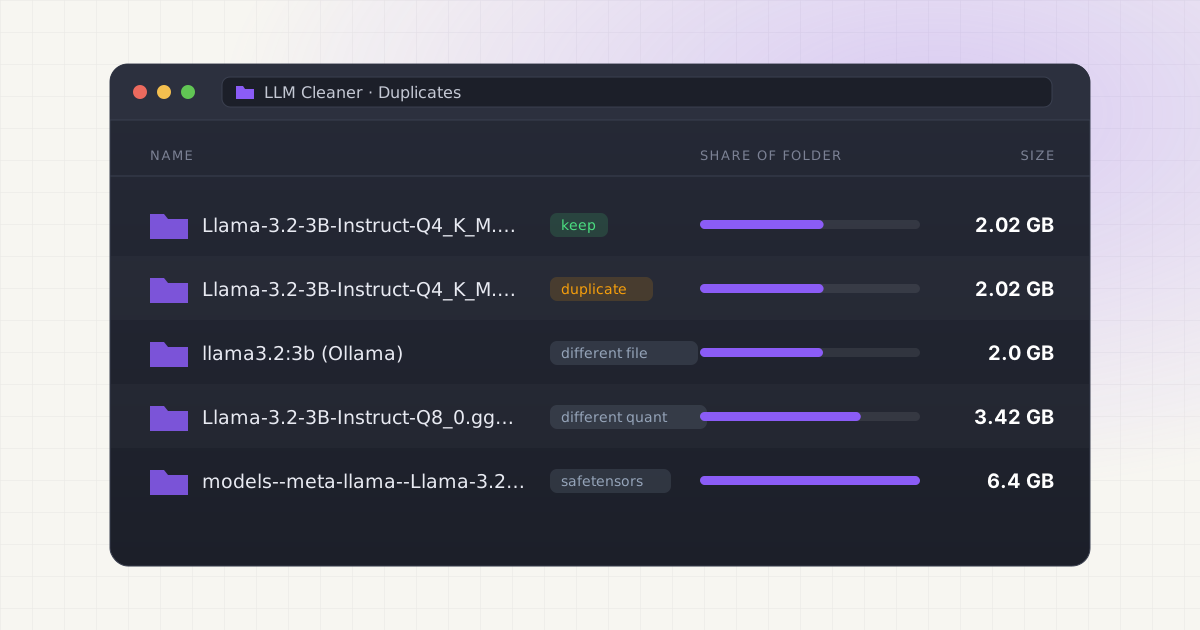
You downloaded Llama in Ollama because that's what the tutorial used. Then you tried LM Studio for its chat window and grabbed the same model there. Later a Python script pulled the original weights from Hugging Face. Same model name, three folders, and maybe 10GB spent on what feels like one thing.
Here's the short answer: Ollama, LM Studio and Hugging Face don't share storage, so each one downloads its own copy. But "same model" usually doesn't mean "same file". Before you delete anything, check whether two files are actually byte-identical, because often they aren't.
Key takeaways
- Ollama, LM Studio and the Hugging Face cache each keep a separate model store with its own folder layout. None of them looks in the others' folders by default.
- A model in Ollama and the "same" model in LM Studio are often different files: different quantization, different converter, or a different format entirely (GGUF, safetensors, MLX).
- Only files with matching SHA-256 hashes are true duplicates.
shasum -a 256is the reliable check. - You can share one GGUF between tools with a symlink or LM Studio's
lms import, but a symlink breaks if the tool that owns the original deletes it. - Use each tool's own delete command where one exists, and keep the copy your main tool manages.
Why the same model ends up on your Mac more than once
Each tool was built to manage its own downloads, and each uses a different naming scheme. That's what makes duplicates hard to spot by eye.
Ollama stores models in ~/.ollama/models on a Mac. Source Weights live in a blobs folder as files named sha256- plus a long digest, and small manifest files map names like llama3.2:3b to those blobs. Our guide on where Ollama stores models on Mac covers the layout.
LM Studio keeps models in ~/.lmstudio/models using a publisher/model/model-file.gguf structure that mirrors Hugging Face repos. Source So the file has a readable name, like Llama-3.2-3B-Instruct-Q4_K_M.gguf. More on that folder in LM Studio models and disk space.
Hugging Face libraries download into ~/.cache/huggingface/hub, in folders named like models--org--name. Inside, real files sit in blobs named by their hash, and snapshots holds symlinks with the original filenames pointing at those blobs. Source See where Hugging Face models are stored on Mac for details.
So one model can appear as a hash in Ollama, a readable filename in LM Studio and a models-- folder in the Hugging Face cache. Finder search for "llama" won't line them up for you.
Same model, different file
This is the part most cleanup advice skips. Two downloads of "Llama 3.2 3B" can differ for several reasons:
- Quantization. A model is published at several precision levels. For Llama 3.2 3B Instruct in GGUF form, one popular repo lists Q4_K_M at 2.02GB, Q5_K_M at 2.32GB, Q8_0 at 3.42GB and f16 at 6.43GB. Source Those are four different files, not four copies.
- Format. Ollama and llama.cpp-based tools use GGUF. Hugging Face's Transformers library typically pulls safetensors. LM Studio on Apple Silicon can also run MLX-format models alongside GGUF. Source A GGUF and an MLX build of the same model share no bytes.
- Who made the GGUF. Ollama's library builds its own GGUF files. A community GGUF on Hugging Face at the same quantization was converted separately, often with different metadata and a different llama.cpp version. Similar size, different file.
| What you have | Typical size | Byte-identical? |
|---|---|---|
Ollama llama3.2:3b vs LM Studio Q4_K_M GGUF | 2.0GB vs 2.02GB | Usually not. Different builds. |
| LM Studio Q4_K_M vs Q8_0 | 2.02GB vs 3.42GB | No. Different quantization. |
| Hugging Face safetensors vs any GGUF | about 6.4GB vs 2–3.4GB | No. Different format. |
| Same GGUF file in LM Studio and ~/Downloads | 2.02GB each | Yes. A true duplicate. |
Ollama hf.co/... pull vs the same quant in LM Studio | Same | Possibly. Check the hash. |
Sizes: bartowski GGUF repo, Ollama llama3.2 tags.
That last row needs explaining. Ollama can run any GGUF straight from Hugging Face with ollama run hf.co/{username}/{repository}, and it picks Q4_K_M by default when the repo has one. Source If you pulled a model that way and also downloaded the same quant in LM Studio, the weights may be the exact same file. That's where a real duplicate is most likely across tools.
Different files aren't necessarily waste, either. Keeping Q4 for speed and Q8 for quality is a valid choice. The question is whether you still use both.
How to find true duplicates by hand
Start broad, narrow by size, then confirm with a hash.
1. List large GGUF files with their sizes in bytes. This searches your home folder, so give it a minute:
find ~ -name "*.gguf" -size +1G -exec stat -f "%z %N" {} + 2>/dev/null | sort -nOllama blobs have no .gguf extension, so list them separately:
find ~/.ollama/models/blobs -size +500M -exec stat -f "%z %N" {} + | sort -n2. Look for exact size matches. Two files can't be identical unless their byte counts match. This prints only sizes that appear more than once:
find ~ -name "*.gguf" -size +1G -exec stat -f "%z" {} + 2>/dev/null | sort | uniq -d3. Hash the candidates. Only hash files that share a size, since hashing a 40GB file takes a while:
shasum -a 256 ~/.lmstudio/models/bartowski/Llama-3.2-3B-Instruct-GGUF/Llama-3.2-3B-Instruct-Q4_K_M.gguf ~/Downloads/Llama-3.2-3B-Instruct-Q4_K_M.ggufMatching hashes mean identical files. Anything else, even one byte, means they're different.
4. Compare against Ollama without hashing its blobs. Ollama names each blob after the SHA-256 of its contents, so you can hash your LM Studio file once and search for that digest:
ls ~/.ollama/models/blobs | grep 6a0746a1ec1aReplace the example with the first dozen characters of your own hash. A match means Ollama holds the same bytes. In the Hugging Face cache, large weight files in blobs are also named by a 64-character SHA-256, as shown in Hugging Face's own cache example, so the same trick usually works there. Source
5. Check that an Ollama blob is a GGUF. Every GGUF file starts with the four bytes GGUF. Source To check a blob:
head -c 4 ~/.ollama/models/blobs/sha256-6a0746a1ec1a...; echoIf it prints GGUF, it's the weights. Small blobs that print something else are templates, licenses or parameters.
Skip the find-and-shasum routine.
LLM Cleaner lists every model across Ollama, LM Studio, Hugging Face and more in one table, flags likely duplicate files, and moves anything you remove to the Trash first.
Sharing one copy between Ollama and LM Studio
If the same GGUF really is in two places, or you'd like LM Studio to use a model Ollama already downloaded, you can point one tool at the other's file.
Symlink an Ollama blob into LM Studio. LM Studio expects a publisher/model/file.gguf path, so make a folder and give the link a .gguf name:
mkdir -p ~/.lmstudio/models/ollama/llama3.2-3b
ln -s ~/.ollama/models/blobs/sha256-6a0746a1ec1a... ~/.lmstudio/models/ollama/llama3.2-3b/llama3.2-3b-Q4_K_M.gguf
Use the full blob name. Ollama's GGUF may not include every setting LM Studio wants, such as the chat template your Ollama Modelfile adds, so test a chat before deleting anything.
Use lms import. LM Studio's CLI has lms import, which brings a local model file into the LM Studio models folder. It moves the file by default, and also takes --copy, -L/--hard-link, -l/--symbolic-link, --user-repo to set the publisher/repo folder, and --dry-run. Source For a stray GGUF in Downloads, the default move is the simplest dedupe there is:
lms import ~/Downloads/Llama-3.2-3B-Instruct-Q4_K_M.gguf --dry-runRemove --dry-run once the target looks right.
Community linkers. Sam McLeod's llamalink linked Ollama models into LM Studio's folder, but the repo was archived in July 2024 in favor of his Gollama tool. Source Gollama itself dropped LM Studio linking in v2.0.1, saying it "became more hassle to maintain than it was worth." Source A newer project, ollama-to-lmstudio-symlinks, links in both directions and handles split GGUFs and vision projectors. Source It's a small third-party tool, so read what it does before running it.
The risks of linking
- The owner can delete the target.
ollama rmremoves blobs no other Ollama model uses, and Ollama prunes unreferenced blobs on startup. It doesn't know LM Studio depends on the file. Your symlink then points at nothing. - Updates change the file. Re-pulling an updated Ollama tag can replace the blob with a new digest, leaving the old link dangling.
- Hard links behave differently. A hard link survives if one name is deleted, which is safer. But the space only comes back once every name is gone, and hard links only work on the same volume.
Duplicates inside the Hugging Face cache
The Hugging Face cache already dedupes within a repo. If a file didn't change between two revisions, both snapshot symlinks point at the same blob, so it's stored once. Source Newer versions of huggingface_hub can also share Xet-stored files across repos through a cache-wide blob store. Source
The waste usually comes from old revisions you'll never load again. hf cache ls shows what's cached, and hf cache prune deletes revisions no branch or tag points to, plus leftover partial downloads. Both take --dry-run. Source
hf cache ls
hf cache prune --dry-run
One catch: per-repo sizes count shared files in every repo that uses them, so adding them up can overstate what deleting would free. Source
Which copy to keep
When two files are identical, keep the one your main tool manages:
- Use Ollama day to day? Keep Ollama's blob. Remove LM Studio's copy, or replace it with a symlink if you still open LM Studio now and then.
- Use LM Studio day to day? Keep the LM Studio file. Remove the Ollama model with
ollama rmif you don't need it there. - Loose file in Downloads? Almost always the one to remove, or
lms importit so it moves into place. - Hugging Face cache copy? Keep it only if code you run loads it by repo ID. Otherwise it can go.
When they're not identical, decide by use, not by name: which quantization do you actually load, and does anything in your code depend on the safetensors version?
Deleting the extra copy safely
Use each tool's own command where it has one, so it can update its own records:
- Ollama:
ollama rm llama3.2:3b. It deletes the manifest and any blob no other Ollama model uses. Full walkthrough in how to delete Ollama models on Mac. - Hugging Face:
hf cache rm model/org/name, or one file with anhf://path. Source - LM Studio or a loose file: delete the
.ggufin Finder so it goes to the Trash.
Before deleting a file, check ls -l. If the second column is higher than 1, it's a hard link and deleting it frees nothing until the other name is gone too. Also check that nothing symlinks to it, like an LM Studio link into Ollama's blobs. If you'd rather keep a model but get it off your internal drive, see moving AI models to an external drive. The general rules for not breaking things are in cleaning local AI models without breaking your setup.
LLM Cleaner does a quick version of the size-then-hash check. For model files of 50MB or more that have exactly the same size, it compares a fingerprint of the first 64KB and marks matches with a DUP badge. That's a fast screen rather than a full checksum, so run shasum -a 256 on a flagged pair before deleting one. It compares individual files best, which covers LM Studio, loose downloads and custom folders. Ollama models and Hugging Face repos are listed as whole models, so for those, the digest lookup above is the better test. Anything you remove goes to the Trash with a one-click restore, and permanent delete needs a second confirmation.
One table for every local model on your Mac.
Ollama, LM Studio, Hugging Face, ComfyUI, Whisper and AI coding caches, with likely duplicates flagged and Trash-first cleanup. One-time $19.
Frequently asked questions
Do Ollama and LM Studio share models?
Not by default. Ollama uses ~/.ollama/models and LM Studio uses ~/.lmstudio/models, and each downloads its own files. You can make them share one GGUF with a symlink or lms import --symbolic-link.
Can LM Studio use Ollama models?
Yes, if you link the Ollama weight blob into LM Studio's folder with a .gguf filename. The blob is a GGUF file, which you can confirm because it starts with the bytes GGUF. If Ollama later deletes or replaces that blob, the link breaks.
How do I find duplicate GGUF files on Mac?
List them with find ~ -name "*.gguf" -size +1G, look for files with exactly the same byte size, then run shasum -a 256 on those. Only matching hashes are real duplicates.
I downloaded the same model in Ollama and LM Studio. Is that a duplicate?
Often not byte for byte. Ollama's library builds its own GGUF, and LM Studio usually downloads a community GGUF, sometimes at a different quantization. They take similar space but are different files. Removing either one still frees its full size.
Is it safe to delete one copy?
Yes, as long as the tool you keep still loads the model and nothing links to the copy you remove. Use ollama rm for Ollama and hf cache rm for Hugging Face, and send loose files to the Trash so you can undo.
Does the Hugging Face cache store duplicates?
Within one repo, no. Unchanged files are stored once and shared between revisions through symlinks. Old revisions can still pile up, so run hf cache prune --dry-run to see what you could free.