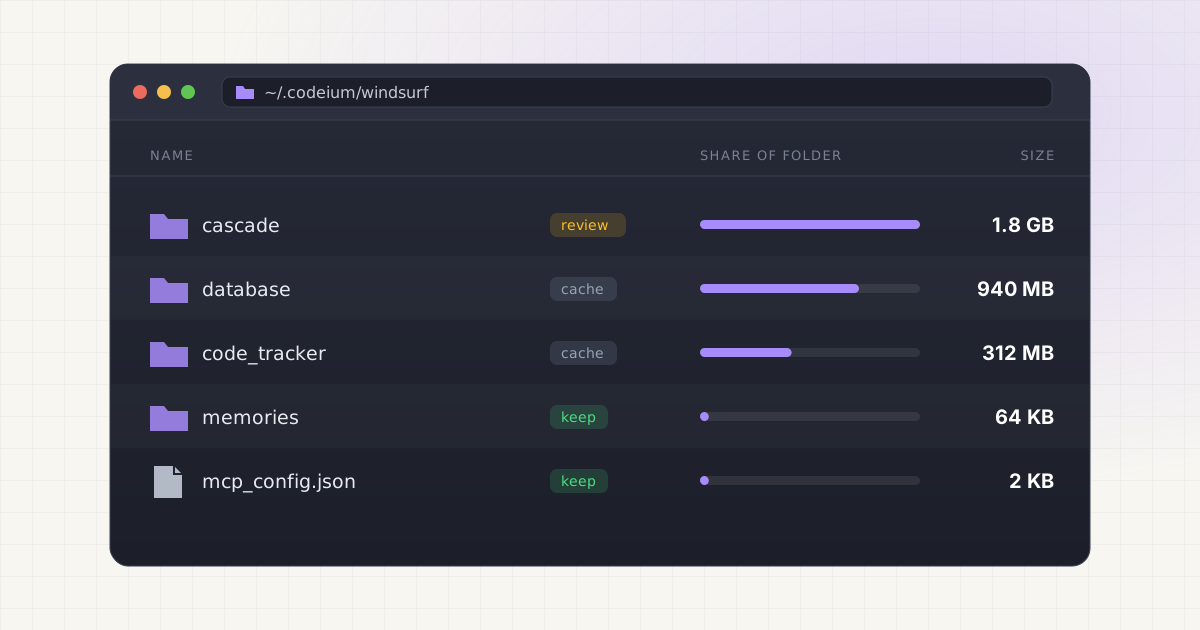
Windsurf, the AI coding editor formerly known as Codeium (and rebranded again in 2026 under Cognition's Devin Desktop umbrella after the acquisition), quietly builds up local data every time you open a project. Chat history, code indexes, extension caches: it all lands on disk somewhere, and the folder names still say windsurf and codeium no matter what the app calls itself this month. Before you delete anything with an unfamiliar name, isn't it worth knowing what each folder actually holds and what breaks if it disappears?
Key takeaways
- Windsurf and Codeium data can add up to well over a gigabyte across several Mac folders, mostly indexes and chat history.
~/.codeium/windsurf/cascadestores your Cascade chat history and local settings, not model weights.- Windsurf runs AI inference in the cloud by default, so there is usually no giant local model file to hunt for.
- Caches tied to finished projects are safe to clear; active project data is worth checking first.
What these tools actually store
AI-powered code editors like Windsurf maintain several distinct kinds of local data, and they are not all created equal. There is the local code index (a structured, searchable map of your project that Cascade uses to answer questions about your codebase), the chat and conversation history (every prompt and response you have exchanged with Cascade), workspace state (per-project settings, open tabs, recent context), and general application cache (network responses, UI state, and other files that rebuild themselves without you noticing). None of this is a mystery once you know where to look, but the naming isn't exactly intuitive.
Unlike a tool such as Ollama, which stores multi-gigabyte model weight files on disk, most of what Windsurf keeps locally is metadata about your code and your conversations rather than the AI model itself. That distinction matters a lot for how you approach cleanup, and it's one of the most common points of confusion when people compare disk usage between different AI coding tools.
Where Windsurf and Codeium files actually live on macOS
Here is a rundown of the main folders you will find on a Mac that has Windsurf installed, based on documented teardowns of real installs and Windsurf's own troubleshooting docs.
| Location | What it holds | Typical safe-to-delete status |
|---|---|---|
~/.codeium | Codeium AI engine data, including the local indexing and embedding engine | Review first, contains chat history subfolder |
~/.codeium/windsurf/cascade | Cascade chat and conversation history, local settings | Deletable, but you lose your chat log |
~/.windsurf | Installed extensions and related configuration | Only if reinstalling extensions from scratch |
~/Library/Application Support/Windsurf | App preferences, storage.json, global state | Careful, holds your editor settings |
~/Library/Caches/Windsurf and ~/Library/Caches/com.exafunction.windsurf | Rebuildable app and network cache | Yes, safe to clear |
~/Library/HTTPStorages/com.exafunction.windsurf | Network and session cache | Yes, safe to clear |
Added together, these folders on a real, actively used Windsurf install can easily total more than a gigabyte, sometimes close to two, without a single model weight file in the mix. That's a lot of disk space for what is, functionally, indexes and text logs. Wondering where your missing gigabytes went after months of coding across dozens of projects? This is usually it.
Want to skip the hidden-folder hunt?
LLM Cleaner scans your Mac for local AI models, caches, indexes, and project memory — then shows what you can review, reveal, export, or safely move to Trash.
Does Windsurf run AI models locally?
This is the question that trips people up the most, especially anyone who's already cleaned out an Ollama install and expects the same pattern here. By default, Windsurf's code completions and Cascade agent send requests to Codeium's (now Cognition's) cloud infrastructure for inference. The local indexing engine builds a searchable representation of your codebase on your machine, but that's embeddings and metadata, not a downloadable model checkpoint sitting in a folder.
Enterprise customers can opt into a self-hosted deployment where the entire AI stack runs on-premises, but that's a company-level infrastructure decision, not something that shows up as a stray multi-gigabyte file on an individual developer's laptop. So if you're hunting for "the model file" the way you might with LM Studio or a local Ollama pull, you're chasing something that probably isn't there. What you'll find instead is index data, and that's worth understanding on its own terms rather than assuming it behaves the same way as a model cache.
How to check what is actually using space before you delete anything
Guessing wastes time. Before removing anything, quit Windsurf completely, then check the real numbers with Terminal:
du -sh ~/.codeium
du -sh ~/.windsurf
du -sh ~/Library/Application\ Support/Windsurf
du -sh ~/Library/Caches/Windsurf
du -sh ~/Library/Caches/com.exafunction.windsurf
du -sh ~/Library/HTTPStorages/com.exafunction.windsurf
Run each line one at a time and note which folders are actually large on your machine. It's common to find that one folder, usually ~/.codeium, accounts for most of the total, while the others are a few megabytes each. Why guess when one command tells you exactly where to focus instead of blindly clearing everything you can find? If you work across several coding tools, the same approach applies to Cursor's per-project workspace folders, which can be just as opaque.
The right question to ask first
Before deleting any cache, ask yourself: is this data from projects I am still actively working on, or from projects I finished or abandoned months ago? Old project indexes and chat history are the safest things to clear out. Current project storage, especially anything tied to active Cascade conversations you might want to reference later, is worth reviewing before you touch it.
This is the same logic that applies across nearly every AI coding tool. Whether it is Claude Code's project memory files or Windsurf's Cascade history, the age and activity status of the project matters more than the folder's size on disk. A 400 MB index for a project you retired a year ago is an easy delete. A 40 MB index for the codebase you are shipping a feature to this week is not.
Why deleting blind is a bad idea
It's tempting to sort folders by size and nuke the biggest ones. The problem is that these storage structures are designed for the tool's internal use, not for human readability, and a folder name that looks disposable might hold your entire conversation history or a settings file you'd rather not rebuild from scratch. Deleting the wrong thing doesn't usually crash the app outright. It just quietly degrades it: Cascade loses context on your codebase, autocomplete gets less accurate until the index rebuilds, and you have to sit through a full reindex on a large repo, which can take a while depending on project size. Worth it just to save a few hundred megabytes?
A safer pattern, whether you're cleaning Windsurf, Cursor, or any other local AI tool, is this: quit the app first, check real folder sizes with du -sh, remove only what's tied to old or finished projects, and leave active-project data alone unless you're prepared to rebuild it. If you want a broader walkthrough that covers this same approach across Ollama, LM Studio, and coding assistant caches together, this guide to cleaning local AI models without breaking your setup is a good next stop.
Not sure what is safe to delete?
LLM Cleaner separates models, rebuildable caches, and project memory so you do not treat everything like junk.
Frequently asked questions
Is it safe to delete ~/.codeium entirely?
Deleting ~/.codeium removes your local indexing data and, since it contains the windsurf/cascade subfolder, your Cascade chat history too. It won't break the app permanently. Windsurf rebuilds indexes automatically the next time you open a project, but you'll lose past conversations and the editor will feel slower until reindexing finishes.
Will clearing the cache log me out of Windsurf?
Usually not. Login tokens and account state generally live separately from the cache and index folders covered here. That said, clearing ~/Library/Application Support/Windsurf can wipe broader app preferences, so if you're unsure, back up the folder before deleting rather than finding out the hard way.
Does clearing the cache fix a frozen or blank Cascade panel?
Often, yes. Windsurf's own troubleshooting documentation points to clearing ~/.codeium/windsurf/cascade as a fix for a blank Cascade panel or a failed-to-start error. It works because it forces a clean rebuild of local chat state, but it does mean losing your existing conversation history in that folder.
How much disk space does Windsurf typically use on a Mac?
It varies by how many projects you have opened and how long you have used the tool, but combined data across ~/.codeium, ~/.windsurf, and the Application Support and Caches folders can easily add up to more than a gigabyte on an active install. Running du -sh on each folder gives you your actual number.
I switched away from Windsurf. Can I remove everything?
Yes. Once the app is uninstalled and you do not plan to return, all the folders listed above (~/.codeium, ~/.windsurf, the Application Support folder, caches, and HTTP storages) can be removed safely. None of them are shared with other applications, so there is nothing else on your system that depends on them.