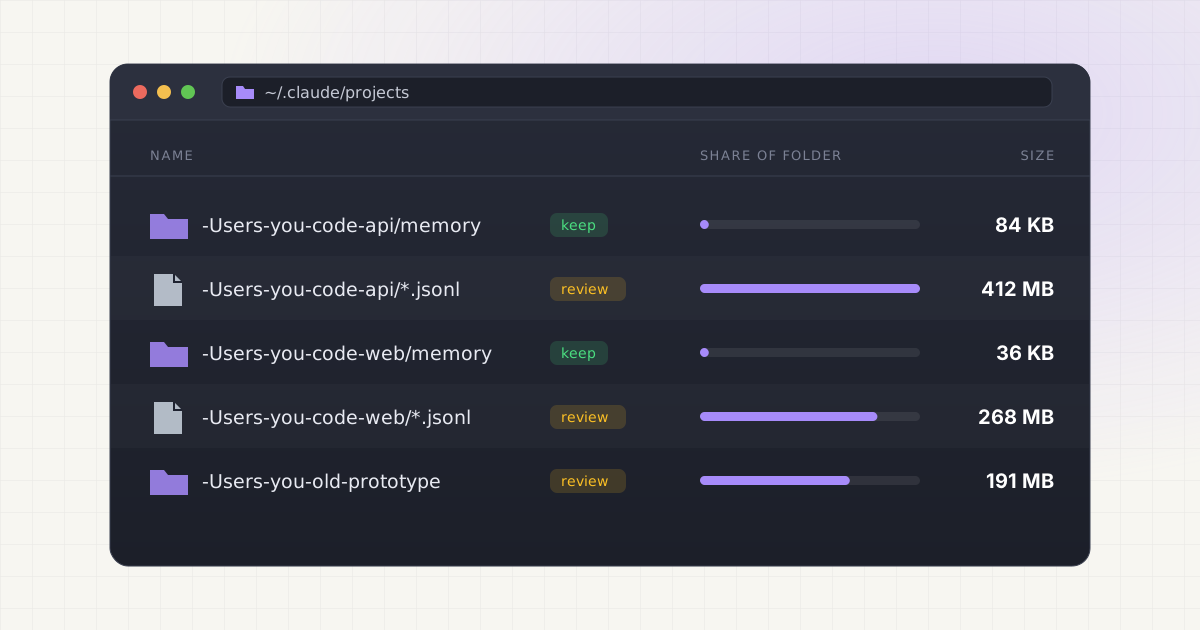
Claude Code doesn't just remember your codebase between sessions. It actually writes files to disk to make that possible, and those files pile up in a home directory folder most people never open. Some of that storage is genuinely disposable, some of it is a CLAUDE.md file you spent an hour tuning, and some of it is memory Claude has been quietly building about your project for months. Before you start clearing space, it helps to know which is which.
Key takeaways
- Claude Code stores two kinds of memory: CLAUDE.md files you write, and auto memory Claude writes itself in
~/.claude/projects/<project>/memory/. - Session transcripts and most cache files clean themselves up automatically after 30 days by default, controlled by
cleanupPeriodDays. - Auto memory is excluded from that automatic sweep and persists until you delete it yourself.
- Deleting
~/.claude.json,settings.json, or a project's CLAUDE.md removes working configuration, not just cache.
This is not always junk
It's tempting to treat everything Claude Code writes to disk the same way you'd treat a browser cache: old, unnecessary, safe to nuke. But is that instinct actually correct? Not for at least two categories of files. The first is CLAUDE.md itself, the plain markdown file you or your team wrote by hand to give Claude persistent instructions about a project: build commands, coding conventions, architecture decisions, the things you don't want to re-explain every session. The second is auto memory, notes Claude writes about itself as it works, things like debugging patterns it discovered, API conventions it learned, or corrections you gave it last week. Anthropic's own documentation is explicit that both are loaded into every new session and both are meant to persist. Delete either one and you're not freeing dead weight, you're erasing working context that took real time, yours or the model's, to build.
- Project-scoped instructions in CLAUDE.md: commands, conventions, and decisions your team relies on
- Auto memory notes in
MEMORY.mdand its topic files, which Claude reads on demand in future sessions - Checkpoint snapshots in
file-history/, which let you roll back edits from unfinished work - Session transcripts less than 30 days old, which still support resume and rewind
What CLAUDE.md files actually are and where they live
CLAUDE.md is just a markdown file. There's no special format and nothing mysterious about it. What makes it powerful is where Claude Code looks for it. According to Anthropic's documentation, there are four scopes, loaded in order from broadest to most specific:
| Scope | Location | Shared with |
|---|---|---|
| Managed policy | e.g. /Library/Application Support/ClaudeCode/CLAUDE.md on macOS | Every user in the org |
| User | ~/.claude/CLAUDE.md | Just you, across all projects |
| Project | ./CLAUDE.md or ./.claude/CLAUDE.md | Your team, via git |
| Local | ./CLAUDE.local.md | Just you, this project only |
Claude Code walks up the directory tree from wherever you launched it, loading every CLAUDE.md and CLAUDE.local.md it finds along the way, plus any nested versions in subdirectories once you're actually working in them. None of these override each other. They get concatenated into context, with instructions closer to your working directory read last. That's why deleting a project's CLAUDE.md isn't like clearing a temp folder. It's closer to deleting a config file a teammate depends on, especially once it's committed to version control.
Auto memory lives somewhere different: ~/.claude/projects/<project>/memory/, keyed to your git repository so every worktree and subdirectory of that repo shares one memory folder. Inside sits a MEMORY.md index, the only part loaded automatically, capped at 200 lines or 25KB, plus separate topic files like debugging.md that Claude reads only when it needs them. This directory is explicitly excluded from Claude Code's automatic cleanup sweep. Nothing ages it out on its own. It sits there until you or Claude edits it, or until you delete it by hand.
Local AI storage is messy. Cleanup should not be.
Find Ollama, LM Studio, Hugging Face, Cursor, Windsurf, Claude Code, Whisper, and loose model files in one place.
What is more clearly safe to review
Not everything in Claude Code's storage is precious. A meaningful chunk of it is designed to be temporary, and Anthropic already deletes most of it automatically. Session transcripts, stored as one .jsonl file per session under ~/.claude/projects/<project>/, along with subagent transcripts and spilled tool-result files, age out after a retention window controlled by the cleanupPeriodDays setting. The default is 30 days, and the minimum allowed value is 1. Shell snapshots, the aliases and functions captured for the Bash tool, get removed on a clean exit and swept up after a crash. Checkpoint snapshots in file-history/ only retain your 100 most recent checkpoints before older ones are pruned.
So what's actually worth reviewing by hand rather than waiting for the automatic sweep? A few categories stand out:
- Prompt history in
history.jsonl, kept indefinitely for up-arrow recall, with nothing enforcing an expiry on it - Old
usage-data/reports generated by/insights, useful once, rarely revisited - Feedback bundles in
feedback-bundles/that were generated but never actually sent to Anthropic - Legacy
todos/,statsig/, andlogs/directories, which current versions of Claude Code no longer write to at all
None of these will break a workspace if you clear them. They're closer to a browser's download history than to a config file you rely on.
A decision framework: what to delete, review, or leave alone
Rather than eyeballing folder sizes and guessing, it helps to sort what Claude Code stores into three buckets. Here's roughly how the major categories shake out:
| File or folder | What it is | Verdict |
|---|---|---|
CLAUDE.md / CLAUDE.local.md | Instructions you or your team wrote | Never delete blindly, it's working config |
projects/<project>/memory/ | Auto memory Claude wrote about your project | Review first, not auto-cleaned |
projects/<project>/<session>.jsonl | Full conversation transcripts | Safe once past the 30-day cleanup window |
file-history/ | Pre-edit checkpoint snapshots | Safe if you don't need to roll back old edits |
shell-snapshots/, debug/, session-env/ | Session-scoped runtime state | Safe to delete anytime |
history.jsonl | Every prompt you've typed | Safe, but you lose up-arrow recall |
todos/, statsig/, logs/ | Legacy, no longer written | Safe to delete |
~/.claude.json, settings.json | Auth, preferences, MCP servers | Do not delete |
So where's the middle ground between guessing and manually poking through folders? Anthropic ships a built-in command for exactly this: claude project purge. Run it with --dry-run against a project path and it prints a full deletion plan, transcripts, matching prompt history lines, and the project's entry in the config file, before you confirm anything. It deliberately leaves auto memory-adjacent structure and shared files like shell-snapshots/ alone, since those aren't scoped to a single project.
The risk of treating all AI files the same way
Standard disk cleanup advice, find the biggest files and delete them, works fine for movies and old disk images. It falls apart for AI coding tools, where the same directory can hold both a rebuildable cache and six months of project memory sitting a few folders apart. Claude Code isn't unique here. Cursor scatters workspace storage across a similarly sprawling tree of folders, and Windsurf's local cache raises the same "is this safe to clear" question. The pattern repeats across nearly every AI coding assistant: fast-growing local storage, mixed content, and no built-in warning before you delete something that mattered.
Why does this happen at all? Because these tools are designed to feel stateless from the terminal. You type a prompt, you get an answer, and there's no visible indicator that anything got written to disk. But local AI agents accumulate storage precisely because they're trying to be useful across sessions, not because they're careless. The storage is the feature. Treating it like disposable cache misunderstands what it's for.
A better approach
Before touching any AI tool's local storage, ask four questions: what is this file, how old is it, which active project does it belong to, and is this category rebuildable or not. A session transcript from three months ago on an abandoned side project is nearly always safe to clear. A CLAUDE.md file at the root of a repo you push to every day is not, no matter how old it looks by file-modified date. The same logic behind cleaning local AI models on a Mac without breaking your setup applies here: figure out what's rebuildable before you delete anything just to reclaim a few gigabytes.
Not sure what is safe to delete?
LLM Cleaner separates models, rebuildable caches, and project memory so you do not treat everything like junk.
Frequently asked questions
Does deleting CLAUDE.md break Claude Code?
No, Claude Code keeps working without it. You'll just lose the persistent instructions it provided, build commands, conventions, architecture notes, so Claude falls back to inferring context from your codebase each session. If the file is committed to version control, deleting your local copy doesn't affect your teammates' copies at all.
Where does Claude Code store auto memory?
In ~/.claude/projects/<project>/memory/, keyed to your git repository so every worktree shares one folder. It contains a MEMORY.md index, loaded at the start of every session up to 200 lines or 25KB, plus separate topic files Claude reads only when it needs them. This directory is excluded from Claude Code's automatic age-based cleanup.
How long does Claude Code keep session transcripts?
By default, 30 days, controlled by the cleanupPeriodDays setting. Transcripts, subagent conversations, and spilled tool-result files under ~/.claude/projects/ age out automatically once they pass that window. You can lower the value to shorten retention, though setting it to zero isn't allowed since Claude Code requires at least one day.
Is it safe to delete the whole ~/.claude/projects folder?
Only if you're willing to lose resume, rewind, and checkpoint restore for every past session, plus auto memory for every project you've worked in with Claude Code. Nothing about your ability to start new sessions breaks. But if any project's memory folder holds context you'd rather not rebuild, back it up first.
What's the safest first step before cleaning anything up?
Run claude project purge <path> --dry-run. It prints exactly what would be deleted for that project, transcripts, matching prompt history, and its config entry, without touching anything, so you can see the plan before committing to it. That's a safer starting point than manually browsing folders and guessing what's disposable.