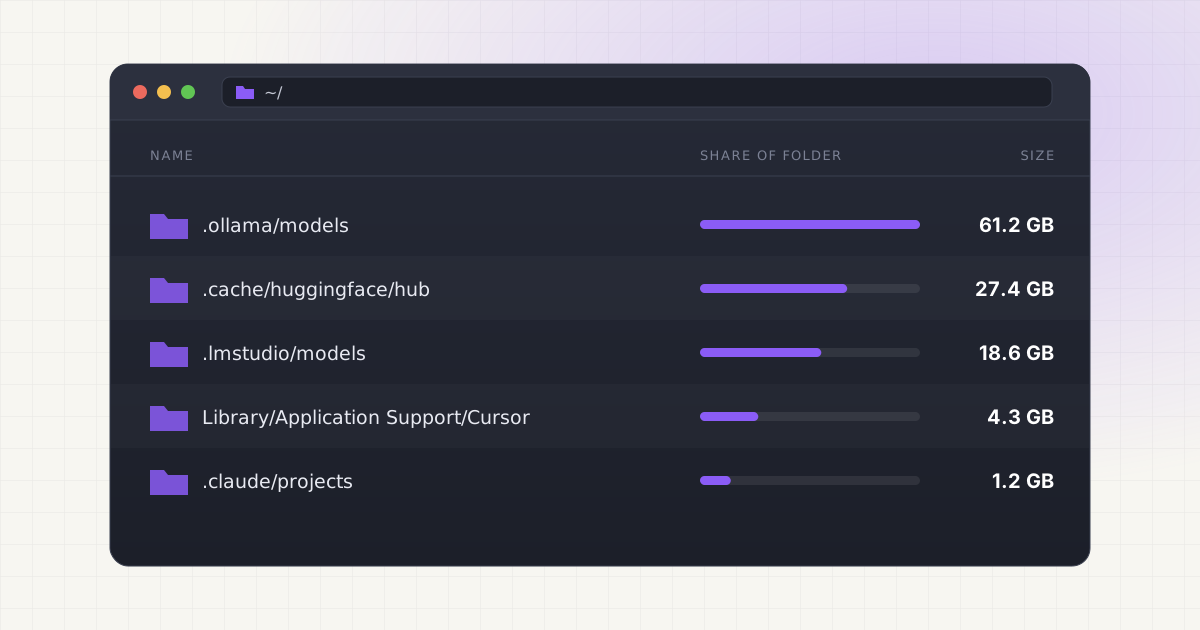
You installed an AI coding assistant, ran a handful of local agents, and now your disk is disappearing for reasons that aren't obvious. That's because AI agents don't just use model files. They generate storage of their own, quietly, in places most people never look.
Key takeaways
- Coding agents store five distinct layers: model weights, workspace memory, embeddings/indexes, logs, and caches, each managed separately.
- Cursor keeps a workspaceStorage folder per project forever, and pack files inside it can pass 1 GB on large repos.
- Windsurf's Codeium engine alone can use around 766 MB, separate from its extensions and app data folders.
- Generic disk cleaners find large files but can't tell context from junk, so deleting the wrong thing breaks a workflow silently.
What agents actually store
A local AI coding workflow usually involves several layers stacked on top of each other, and each one grows independently. There's the model backend, typically Ollama or a similar runtime, holding the actual weight files. There's the agent's workspace and context, meaning project memory, conversation history, and task state that persists between sessions. There's a layer of embeddings and indexes, the retrieval vectors an agent builds so it can search your codebase or documents without rereading everything from scratch. There are logs and traces, since most agents record every action and tool call for debugging. And there are caches: intermediate results, cached API responses, and downloaded tool dependencies that never get cleared automatically.
None of these layers know about each other. A model file living in ~/.ollama/models has nothing to do with the workspace index Cursor built for the same project, and neither of those has anything to do with the log files your terminal-based agent wrote last Tuesday. Each tool manages its own slice, and none of them clean up after themselves with any urgency.
The tools involved, and where they actually keep their data
Claude Code stores project memory in two places: a project-level CLAUDE.md file in the repo itself, and a global one at ~/.claude/CLAUDE.md that applies across every session. On top of that, auto-generated memory (debugging insights, architecture notes the agent picked up) lives under ~/.claude/projects/<project>/memory/. Some of that is genuinely useful context you built up over months. Some of it is a debugging session from a bug you fixed in March. For more detail on which of those files matter, see what's actually safe to delete from Claude Code's project memory.
Cursor is arguably the worst offender for silent accumulation. It opens a new entry in ~/Library/Application Support/Cursor/User/workspaceStorage/ for every project you've ever opened, and it holds onto that entry indefinitely, even after you've deleted the project itself from your Mac. Inside each workspace folder sit .pack files that store local edit history, and on a large monorepo those can pass 1 GB per workspace. Chat history and project-level state live separately in ~/.cursor/chats/, ~/.cursor/projects/, and a SQLite database at ~/Library/Application Support/Cursor/User/globalStorage/state.vscdb. If you've opened a hundred projects in Cursor over a year, you likely have a hundred workspaceStorage folders sitting there, most for projects you'll never reopen. We cover the specifics in why Cursor generates so many workspace folders.
Windsurf (formerly Codeium) spreads its footprint across three separate locations. The Codeium AI engine itself lives in ~/.codeium/ and commonly runs around 766 MB on its own. Cascade chat history sits inside that same directory, at ~/.codeium/windsurf/cascade. Extensions live in ~/.windsurf/ (often 400 to 500 MB), and general app data, logs, and workspace history sit in ~/Library/Application Support/Windsurf/, adding another few hundred megabytes. None of these three locations get cleaned when you uninstall the app through normal means. See what's safe to remove from Windsurf's cache for a walkthrough.
Other tools in the same category, like GitHub Copilot and various open-source agent frameworks, keep their own model caches and conversation history too. It's the same pattern everywhere: isolated storage, no shared awareness, and no built-in incentive for any single tool to clean up.
Local AI storage is messy. Cleanup should not be.
Find Ollama, LM Studio, Hugging Face, Cursor, Windsurf, Claude Code, Whisper, and loose model files in one place.
A rough map of what's taking the space
Not every gigabyte on this list matters the same way. Some of it regenerates the moment you reopen a project. Some of it is a record you can't get back. The table below is a rough guide, not exact numbers, since actual sizes vary by project and usage history.
| Storage type | Rebuildable? | Typical size | Generally safe to remove |
|---|---|---|---|
| Model weights (Ollama, LM Studio blobs) | Yes, re-downloadable | 2 to 40 GB per model | Yes, if not in active use |
| Workspace indexes / embeddings | Yes, agent rebuilds on next open | 100 MB to 2 GB per project | Yes, expect a slower first run after |
| Conversation / session logs | No, history is lost | 10 MB to 1 GB per project | Usually, unless you need the record |
| Project memory (CLAUDE.md, notes) | No, hand-curated context | KB to a few MB | No, review before touching |
| Edit history / pack files | No, but rarely needed | 100 MB to 1 GB+ per workspace | Usually, for closed projects |
| Dependency / API response caches | Yes, re-downloaded on demand | 500 MB to 5 GB | Yes |
The pattern is simple once you see it laid out: anything an agent can rebuild is low-risk to delete. Anything that represents a record, a decision, or curated context is not, even if it's small. Size and importance don't correlate, which is exactly why a tool that just sorts by file size gets this wrong.
Why standard disk cleaners miss this
A generic disk cleaner looks for large files and old files. It will find model blobs if they're big enough to trip its threshold, but it has no idea what those files are, whether an agent still depends on them, or which project they belong to. It certainly won't distinguish a stale .pack file from a live state.vscdb that Cursor is actively reading from.
Worse, deleting the wrong thing rarely fails loudly. Remove a model blob an active agent depends on and you won't get a clean error message, you'll get a subtle failure: an agent that suddenly can't complete a task, or a tool that silently falls back to a slower cloud model. Isn't that worse than an outright crash? A crash tells you something's wrong immediately. A silent degradation might not surface for days, and by then you've forgotten what you deleted.
This problem is only getting more common. Adoption of AI coding tools has climbed fast: Stack Overflow's 2025 Developer Survey found 84% of developers now use or plan to use AI tools, up from 76% the year before. More developers running more agents locally means more of exactly this kind of scattered, tool-specific storage building up on more machines, most of it invisible to the person whose disk it's filling. If you're also running local models directly, the same review-before-delete logic applies there. See where Ollama actually keeps its model files for the model-layer half of this problem.
The review-before-delete principle
The right approach is always the same: see everything first, understand what each item actually is, then decide what to remove. That matters more for agent caches and project memory than for almost anything else on your disk, because the value of a given file has nothing to do with its size. A 200 KB memory file might represent months of accumulated project context. A 3 GB workspace index might be worth nothing the moment you close the project.
Sort by recency and project relevance, not just size. Ask whether a project is still active before touching anything tied to it. And treat logs and caches differently from memory and notes, since one category is disposable and the other might not be. If you want a fuller walkthrough of doing this without breaking an active setup, we've written about it in how to clean local AI models without breaking your existing setup.
None of this requires guesswork if you can actually see what's on disk before you act. That's the whole difference between a cleanup that saves you 40 GB and one that quietly breaks three projects you forgot you had open.
Not sure what is safe to delete?
LLM Cleaner separates models, rebuildable caches, and project memory so you do not treat everything like junk.
Frequently asked questions
Is it safe to delete Cursor's workspaceStorage folders?
Generally yes, for projects you've closed and won't reopen soon. Cursor rebuilds the index and pack files the next time you open that folder. The tradeoff is a slower first load and loss of local edit history for that workspace, so check you don't need the history before deleting.
Will deleting Claude Code's memory files break anything?
Not technically, but you'll lose accumulated context. Auto-generated memory under ~/.claude/projects/<project>/memory/ helps Claude recall past debugging insights and architecture notes for that project. Deleting it doesn't break the tool, it just resets what Claude remembers about that specific codebase.
Why does Windsurf use so much disk space if I barely use it?
Its footprint is spread across three locations that don't get cleaned together: the Codeium engine, extensions, and app data/logs. Even light use leaves all three growing slowly, and none of them shrink automatically when you close the app or switch projects.
Can I just delete everything in these folders and start fresh?
You can, but you'll lose project memory, conversation history, and any curated context an agent had built up, none of which comes back. It's safer to review what's there first and remove what's clearly disposable (old logs, stale indexes for deleted projects) rather than wiping the whole directory.
Do these storage issues affect Windows or only Mac?
The same pattern shows up on Windows and Linux too, since these tools use similar per-workspace storage models everywhere. The exact folder paths differ (AppData instead of Library/Application Support), but the underlying problem, scattered caches with no shared cleanup, is identical across platforms.