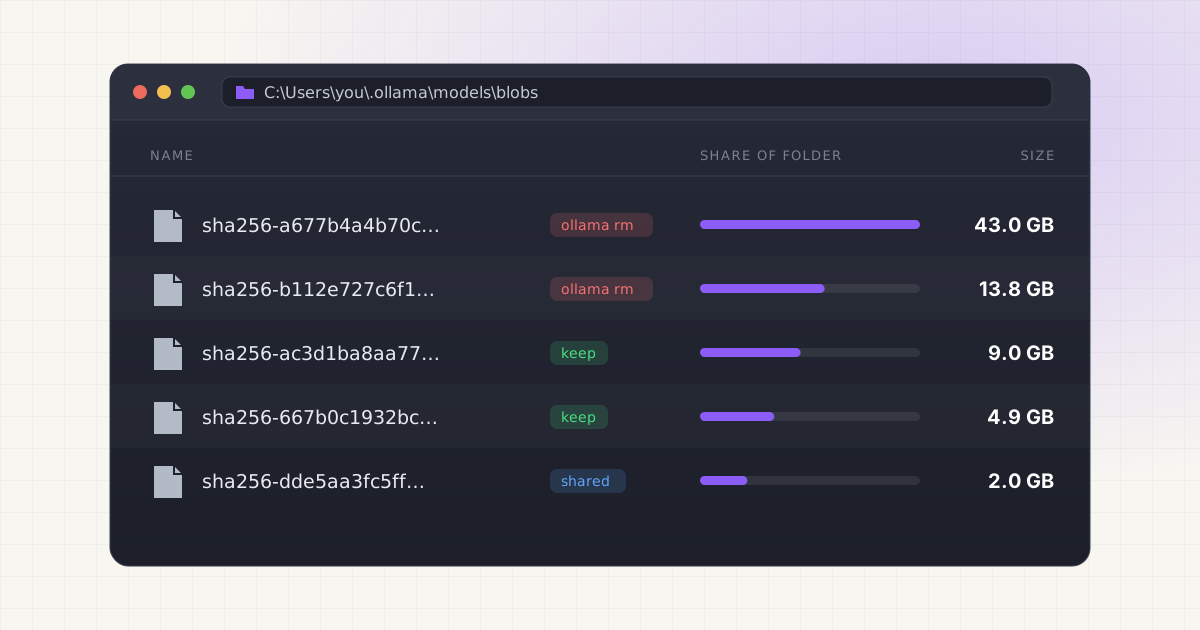
To delete an Ollama model on Windows, open PowerShell or Command Prompt, run ollama list to get the exact name, then run ollama rm <name>. For example, ollama rm llama3.1:70b removes a 43 GB model. That is the supported way to do it, and it frees the space straight away.
If the free space on C: doesn't go up, there's almost always a specific reason: another model shares the same weights, leftover files from an interrupted download, or your models were never on C: to begin with. This guide covers the delete itself, how to check that it worked, each of those reasons, and how to remove Ollama completely.
Key takeaways
ollama listshows installed models.ollama rmaccepts one or more names and unloads a running model before deleting it.- Models live in
C:\Users\<you>\.ollama\modelsunlessOLLAMA_MODELSpoints somewhere else. ollama rmdeletes files directly. Nothing goes to the Recycle Bin, so there is no undo.- Weights shared with another installed model stay on disk. Orphaned files are cleaned up the next time Ollama starts, unless
OLLAMA_NOPRUNEis set. - The Windows uninstaller offers to remove models in the default folder, but keeps a custom
OLLAMA_MODELSfolder.
Step 1: List your models
Open PowerShell, Windows Terminal or Command Prompt. The ollama command works in all three because the installer adds it to your user PATH. Source Run:
ollama listollama ls does the same thing. Source You'll get a table with NAME, ID, SIZE and MODIFIED columns. The name includes a tag after the colon, such as qwen3:30b or llama3.2:latest. Copy it exactly.
If Ollama isn't running, the command starts the Ollama app in the background for you. On Windows the CLI looks for ollama app.exe next to itself or in %LOCALAPPDATA%\Ollama and launches it hidden. Source
A typical cleanup list, using sizes from Ollama's library pages:
| Model | Size in Ollama's library | Usual verdict |
|---|---|---|
| llama3.1:70b | 43GB | Delete if it runs too slowly on your GPU |
| deepseek-r1:32b | 20GB | Delete if you tried it once |
| gpt-oss:20b | 14GB | Keep if it's your main model |
| qwen2.5-coder:14b | 9.0GB | Keep one coder size, not three |
| llama3.2:3b | 2.0GB | Small enough to keep |
Sources: llama3.1, deepseek-r1, gpt-oss, qwen2.5-coder, llama3.2
Step 2: Delete with ollama rm
ollama rm llama3.1:70bOllama prints deleted 'llama3.1:70b'. Before deleting, the CLI asks the server to unload the model from memory, so you don't have to stop it first. Source That matters more on Windows than elsewhere, because Windows won't delete a file that a running process has open.
To remove several models in one go, list them all:
ollama rm llama3.1:70b deepseek-r1:32b qwen2.5-coder:7bTo remove every installed model in PowerShell, skip the header row, take the first column, and pass the names along:
$names = ollama list | Select-Object -Skip 1 | ForEach-Object { ($_ -split '\s+')[0] }
$names
ollama rm $names
The middle line prints the list so you can read it before the last line deletes everything. There's no confirmation prompt.
Step 3: Check the space came back
Measure the models folder before and after. In PowerShell:
$dir = if ($env:OLLAMA_MODELS) { $env:OLLAMA_MODELS } else { "$env:USERPROFILE\.ollama\models" }
$bytes = (Get-ChildItem $dir -Recurse -File -Force | Measure-Object Length -Sum).Sum
"{0:N1} GB in {1}" -f ($bytes / 1GB), $dir
Compare that number with the SIZE column of what's left in ollama list. Two things to keep in mind. First, ollama list uses decimal gigabytes (1 GB = 1,000,000,000 bytes), while PowerShell's 1GB and File Explorer use 1,073,741,824 bytes, so the folder will look about 7% smaller than the list. Source Second, if the folder is much bigger than the models you still have, you have orphaned blobs. The next section deals with them.
To see the biggest files directly:
Get-ChildItem "$dir\blobs" | Sort-Object Length -Descending |
  Select-Object -First 10 Name, @{ n = 'GB'; e = { [math]::Round($_.Length / 1GB, 1) } }
Where Ollama's files actually live
Ollama's FAQ lists the Windows model folder as C:\Users\%username%\.ollama\models. Source Inside it:
manifests\registry.ollama.ai\library\<model>\<tag>holds one small file per installed model and tag. It lists which blobs the model needs.blobsholds the data, in files namedsha256-plus a hash. The weights are the one big file. Templates, licenses and parameters are tiny ones.
Two other folders belong to Ollama but hold no models: %LOCALAPPDATA%\Programs\Ollama (the program) and %LOCALAPPDATA%\Ollama (logs and downloaded updates). Source
To find out which blob is a model's weights, print its Modelfile. The FROM line shows the full path to the blob:
ollama show --modelfile llama3.1:70bFor a wider look at every AI folder on your PC, not only Ollama's, see where AI models are stored on Windows.
Why the space didn't come back
1. Another model shares the same weights
When you delete a model, Ollama removes its manifest, then deletes each blob that no other installed manifest still references. Shared blobs stay. Source The usual culprits:
- Tag aliases.
qwen3:latestandqwen3:8bare both listed at 5.2GB because they're the same model. Source Pull both and remove one, and nothing is freed until you remove the other. - Copies and custom models. A model made with
ollama cp, or built from a Modelfile withFROM llama3.1:8b, points to the base model's weights.
Look at the ID column in ollama list. Rows with the same ID are the same model under different names.
2. Orphaned blobs from interrupted pulls
A cancelled download or an old version of a tag you re-pulled can leave blobs that no manifest uses. Ollama cleans these up itself: each time the server starts, it prunes unreferenced blobs, unless OLLAMA_NOPRUNE is set. Source The variable is described in Ollama's config as "Do not prune model blobs on startup". Source
So restart Ollama: right-click the llama icon in the system tray, choose Quit Ollama, then open Ollama from the Start menu. Source Measure the folder again. If you might have set OLLAMA_NOPRUNE at some point, check and clear it:
[Environment]::GetEnvironmentVariable('OLLAMA_NOPRUNE', 'User')
[Environment]::SetEnvironmentVariable('OLLAMA_NOPRUNE', $null, 'User')
Then restart Ollama once more so it prunes.
3. Your models are on another drive
If OLLAMA_MODELS is set, Ollama stores models there instead of under your profile. Source Deleting a model then frees space on D: or wherever that folder is, and C: doesn't change. It also works the other way: if you set the variable but didn't restart Ollama, new downloads may still have gone to C:. Check what the running server uses in its log:
Select-String -Path "$env:LOCALAPPDATA\Ollama\server.log" -Pattern "OLLAMA_MODELS" | Select-Object -Last 1If a folder is set there, measure that folder. If it's empty, the server is using the default.
4. You deleted files in Explorer, so they're in the Recycle Bin
ollama rm never uses the Recycle Bin. But if you deleted the .ollama folder or some blobs in File Explorer, Windows may have moved them to the Recycle Bin, where they still take up space on the same drive until you empty it. Very large deletions can also exceed the Recycle Bin's size limit, in which case Windows asks whether to delete permanently instead.
5. Ollama runs inside WSL
If you installed Ollama inside a WSL Linux distribution rather than with the Windows installer, models live inside that distro, at /usr/share/ollama/.ollama/models for the standard Linux install. Source That data sits inside a virtual disk file, ext4.vhdx, under your AppData folder. Source Deleting models frees space inside Linux, but the .vhdx file on C: doesn't necessarily shrink. Microsoft's sparseVhd setting, off by default, makes newly created WSL disks sparse. Source
Want an undo button?
LLM Cleaner sends Ollama models to the Recycle Bin instead of deleting them outright, shows them by name, and restores them in one click.
Why not just delete blob files by hand
Sorting blobs by size in Explorer and deleting the biggest file is tempting. It goes wrong in predictable ways:
- Blob names are hashes. The 14 GB file you think is an old model may be the one your current model uses.
- A blob shared by two models breaks both. They still appear in
ollama list, then fail when you run them. - Removing a blob without its manifest leaves a manifest pointing at nothing. Removing a manifest without its blobs leaves orphans until the next restart.
- While Ollama has a model loaded, Windows will refuse to delete its file with a "file in use" message.
If something does break, ollama pull <model> downloads whatever is missing. It costs bandwidth, not data. The same rules apply on a Mac; see how to delete Ollama models on Mac.
Uninstall Ollama completely
Ollama registers a normal uninstaller. Open Settings > Apps > Installed apps (Add or remove programs on Windows 10), find Ollama and choose Uninstall. Source
According to Ollama's installer script, the uninstaller shows a "Remove models" checkbox with the size of your default model folder, ticked by default. It also removes %LOCALAPPDATA%\Ollama, %LOCALAPPDATA%\Programs\Ollama, temporary ollama* folders in %TEMP%, your prompt history, and the Startup shortcut. A custom OLLAMA_MODELS folder is preserved. Source
After it finishes, check for leftovers:
Test-Path "$env:USERPROFILE\.ollama"
[Environment]::GetEnvironmentVariable('OLLAMA_MODELS', 'User')
If .ollama still exists, it holds configuration and keys, plus models if you unticked the checkbox. Delete it if you're done with Ollama. If OLLAMA_MODELS returns a path, delete that folder and clear the variable:
Remove-Item "$env:USERPROFILE\.ollama" -Recurse -Force
[Environment]::SetEnvironmentVariable('OLLAMA_MODELS', $null, 'User')
Remove-Item deletes permanently, without the Recycle Bin. Run it only once you're sure.
Move instead of delete
If the goal is a free C: drive rather than fewer models, move them. Quit Ollama, copy .ollama\models to D:, set OLLAMA_MODELS to the new folder, and start Ollama again. Source Our C: drive full from AI models guide has the full commands, including the junction option that needs no settings change. And before you move anything, check that you don't have the same model in LM Studio too. Duplicate models across tools explains why that's so common.
Who this is for
- Gamers with a 1 TB C: drive. A 43 GB 70B model is the size of a large game install. If you tried it once and went back to an 8B model, that space is sitting idle.
- Developers on a laptop. Trying every new coder model is how a 512 GB SSD fills up. Keeping one or two sizes and deleting the rest is usually enough.
- People who tried Ollama and moved on. If you now use LM Studio or a cloud model, the uninstall section above gets everything back.
- Anyone sharing a PC. Each Windows user account has its own
.ollamafolder, so check every profile.
Doing it with LLM Cleaner
The command line works fine when you know what you're deleting. LLM Cleaner for Windows helps with the parts that are awkward by hand:
- It reads Ollama's manifests, so blobs show up as real model names with real sizes, including models in a custom
OLLAMA_MODELSfolder. - Layers shared between models are counted once and are never removed while another model still uses them.
- Deleted models go to the Recycle Bin first and stay visible in the app, so you can restore one with a click. Permanent delete is a separate, confirmed step.
- It scans LM Studio, Hugging Face, ComfyUI, Whisper and coding caches in the same pass, and flags duplicates of 50 MB or more by size plus a content fingerprint.
- To move models to another drive instead, it leaves a junction (or a symlink for single files, which needs Developer Mode) so Ollama keeps working.
Everything runs locally. Only the license and update checks go online. One $19 license covers two computers, any mix of Windows, Mac and Linux.
Clean up Ollama with a safety net.
Models by name, shared layers protected, Recycle Bin first. $19 once for two computers.
FAQ
How do I delete an Ollama model on Windows?
Open PowerShell or Command Prompt, run ollama list, then ollama rm <name> with the exact name and tag, for example ollama rm qwen3:30b.
Does ollama rm send models to the Recycle Bin?
No. It deletes the files directly, so emptying the Recycle Bin won't change anything and there is no restore. To get a model back, pull it again.
I deleted a model but my C: drive still has the same free space. Why?
Either another installed model shares the same weights, orphaned blobs are waiting for Ollama to restart, or your models are stored on another drive through OLLAMA_MODELS. Check the ID column in ollama list, restart Ollama from the tray, and look at the OLLAMA_MODELS line in server.log.
Can I delete the .ollama folder?
Yes, after quitting Ollama from the system tray. It removes every model plus Ollama's local configuration. Ollama recreates the folder the next time it starts.
Does uninstalling Ollama delete my models?
The uninstaller offers a "Remove models" checkbox for the default folder, ticked by default. A custom OLLAMA_MODELS folder is kept, and you need to delete it yourself.
Where are Ollama's logs on Windows?
In %LOCALAPPDATA%\Ollama. server.log records the settings the server started with, including the models folder.