Clean up local AI models on Linux and DGX Spark
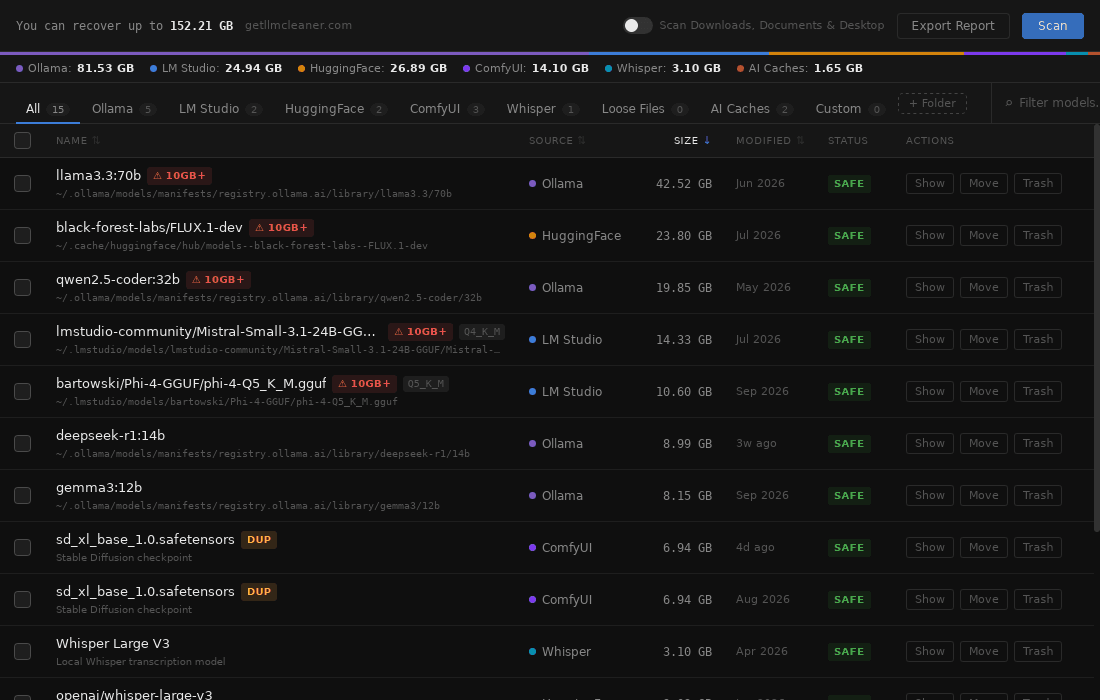
On Linux, models end up in more places than on any other OS: the Ollama service under /usr/share/ollama, the Hugging Face cache that vLLM and Transformers share, LM Studio, ComfyUI checkouts, Whisper and coding-assistant caches. LLM Cleaner finds them all in one scan, flags duplicates and moves what you remove to the Trash, where it can be restored.
One-time payment · use it on any 2 computers · also runs on NVIDIA DGX Spark · Already bought? Get your installer
- .deb, .rpm and AppImage
- freedesktop Trash, restore any time
- $19 once, for any 2 computers
Who it's for
Linux workstations are where people serve models, not just try them. LLM Cleaner is for ML engineers running vLLM or Transformers, people who self-host Ollama behind Open WebUI, ComfyUI users on an NVIDIA card, and owners of an NVIDIA DGX Spark who pull large models to test the hardware. It also covers developers using Claude Code, Codex, Cursor or Windsurf, whose caches grow in the background.
The usual pattern: a fast NVMe root partition fills up with models you pulled once to benchmark, plus older revisions of models you still use, plus the same weights stored a second time by another tool.
Where models live on Linux
Some of these are owned by other users, some are hidden dot-folders, and all of them can be moved by environment variables.
| Tool | Default location | What's in it |
|---|---|---|
| Ollama (system service) | /usr/share/ollama/.ollama/models | Where the official install script’s systemd service keeps models. Owned by the ollama user. |
| Ollama (user) | ~/.ollama/models (or OLLAMA_MODELS) | Used when you run ollama serve as yourself. |
| Hugging Face | ~/.cache/huggingface/hub (or HF_HOME, HF_HUB_CACHE) | Shared by vLLM, Transformers, Diffusers, faster-whisper and most Python tooling. |
| LM Studio | ~/.lmstudio/models, older installs ~/.cache/lm-studio/models | GGUF models, or a custom downloads folder. |
| ComfyUI | ComfyUI/models in your checkout | Checkpoints, LoRAs, VAEs. Extra folders come from extra_model_paths.yaml. |
| Whisper | ~/.cache/whisper | OpenAI Whisper checkpoints. |
| Coding assistants | ~/.claude, ~/.codex, ~/.codeium, ~/.config/Cursor | Session history, indexes, caches and project memory. |
Check sizes yourself with du -sh ~/.ollama ~/.cache/huggingface ~/.lmstudio 2>/dev/null and sudo du -sh /usr/share/ollama/.ollama/models. More commands in how to find hidden AI model files.
Why rm -rf is the wrong tool here
- No undo.
rmskips the Trash. A typo in a path is permanent. - Ollama blobs are shared. Files in
models/blobsare named by hash and can belong to several models. Delete the wrong one and a model you use stops loading. - The Hugging Face cache uses symlinks.
snapshots/links intoblobs/. Removing snapshots frees almost nothing, removing blobs leaves dangling links. - Two Ollama stores. Running
ollama serveas yourself and as the system service gives you two separate model folders, often holding the same models. - Containers hide duplicates. A Docker volume or bind mount for vLLM or Open WebUI may hold another copy of weights you already have in the host cache.
How LLM Cleaner handles it
Scan
Checks the system Ollama service store, your own
~/.ollama,OLLAMA_MODELS, the Hugging Face cache (HF_HOME,HF_HUB_CACHE), LM Studio, ComfyUI with itsextra_model_paths.yaml, Whisper and coding caches. Add any other directory, such as a NIM cache, a Docker volume path or a shared/data/models.Review
Every model is listed with its name, source, size, path and date. Duplicates of 50 MB or more are flagged by size plus a partial content fingerprint, so an LM Studio copy and an Ollama copy of the same GGUF show up together.
Trash or move
Move models to the freedesktop Trash, or move them to another disk. A symlink at the old path keeps your tools and scripts working.
Restore
Trashed models stay in the list with an "In Trash" badge and come back with one click.
Built for Linux
Finds the service store
Models pulled by the systemd service under /usr/share/ollama are included, not just your home folder.
Shared blobs stay safe
Ollama layers are counted once and never removed while another model uses them.
Standard Trash
Uses the freedesktop Trash, so GNOME Files, Dolphin and Nemo can restore too.
Catch copies across tools
Same weights stored by Ollama, LM Studio and the HF cache are flagged together.
Move to another disk
Copy models to a second NVMe or external drive and leave a symlink behind.
.deb, .rpm, AppImage
x64 and ARM64. Install with your package manager or run the AppImage directly.
LLM Cleaner on NVIDIA DGX Spark
The DGX Spark runs DGX OS, which is based on Ubuntu 24.04 on ARM64. With enough unified memory to load very large models, it's easy to pull several of them to compare, and the internal SSD fills accordingly. Install the ARM64 .deb:
sudo apt install ./LLM*Cleaner_*_arm64.debLLM Cleaner then picks up:
- Models pulled by the system-wide Ollama service in
/usr/share/ollama/.ollama/models. - The Hugging Face cache used by vLLM and Transformers (
~/.cache/huggingface/hub, or whereverHF_HOMEpoints). - Any folder you add, such as a NIM cache or a shared model directory.
The same ARM64 build also runs on NVIDIA Jetson and Raspberry Pi 5 with a desktop session.
Install
Debian, Ubuntu, Mint, Pop!_OS, DGX OS:
sudo apt install ./LLM*.debFedora, RHEL, openSUSE:
sudo dnf install ./LLM*.rpmAny other distro:
chmod +x LLM*.AppImage
./LLM*.AppImage
Requires a desktop session. Supported on Ubuntu 22.04+, Debian 12+ and Fedora 39+. Open the app, paste your license key and run a scan.
First launch
There is no SmartScreen or Gatekeeper step on Linux. If you use the AppImage and it won't start, check that it's executable. Some distributions also need the FUSE 2 library for AppImages (libfuse2 on Ubuntu 22.04, libfuse2t64 on 24.04).
LLM Cleaner runs entirely on your machine. Only license activation and update checks touch the network.
Questions about the Linux app
Which distributions are supported?
Ubuntu 22.04 and later, Debian 12 and later, and Fedora 39 and later, plus derivatives such as Linux Mint, Pop!_OS and DGX OS. The AppImage runs on most other desktop distributions. Builds are available for x64 and ARM64.
Does LLM Cleaner work on NVIDIA DGX Spark?
Yes. DGX OS is based on Ubuntu 24.04 on ARM64, so install the ARM64 .deb. LLM Cleaner finds models pulled by the system Ollama service in /usr/share/ollama/.ollama/models and the Hugging Face cache used by vLLM and Transformers.
Where do deleted models go on Linux?
To the standard freedesktop Trash in ~/.local/share/Trash, the same one GNOME Files, Dolphin and other file managers use. You can restore from LLM Cleaner or from your file manager.
Why does my Ollama folder in my home directory look empty?
If you installed Ollama with the official script, it runs as a systemd service under its own ollama user, and models go to /usr/share/ollama/.ollama/models instead of ~/.ollama. LLM Cleaner checks both locations.
Does it need root?
No. You install the package with sudo like any other .deb or .rpm, but the app itself runs as your user. The AppImage needs no installation at all. Files owned by another account, such as the ollama service user, follow normal Linux permissions.
Does it work on a headless server?
LLM Cleaner is a desktop app and needs a graphical session. On a DGX Spark that means the local desktop or a remote desktop session.
Does anything get uploaded?
No. Scans run locally. The only network requests are license activation and update checks.
Reclaim your root partition
One scan across the Ollama service, the Hugging Face cache and every other tool. Trash what you don't use and restore it if you were wrong.
One-time payment · use it on any 2 computers · also runs on NVIDIA DGX Spark · Already bought? Get your installer