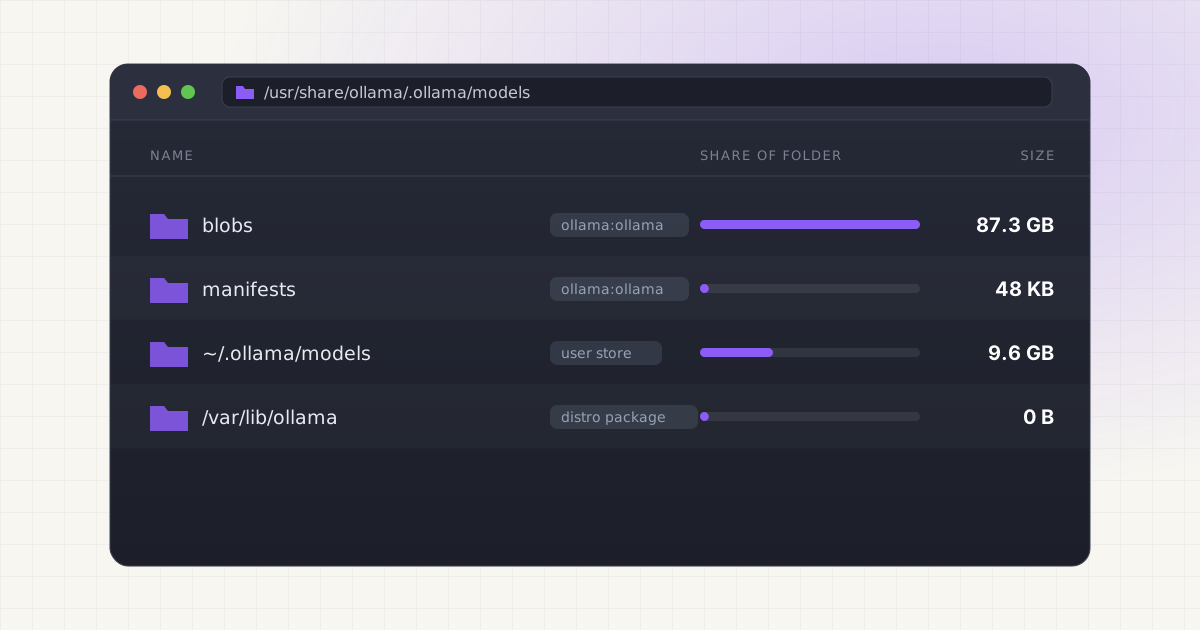
You installed Ollama on Linux, pulled a few models, and then went looking for them. ~/.ollama is empty or tiny. df says the space is gone. Where did 80GB of weights go?
The answer depends on how Ollama is running. If you used the official install script, Ollama runs as a systemd service under its own ollama user, and models are stored in /usr/share/ollama/.ollama/models. If you start ollama serve yourself, models go to ~/.ollama/models in your home folder. Either location can be changed with the OLLAMA_MODELS environment variable. Source
Key takeaways
- The install script creates an
ollamasystem user with home/usr/share/ollamaand a service that runsollama serveas that user. - Models pulled from your own shell still go to the service's folder, because the CLI just talks to whichever server is listening on port 11434.
- Some distribution packages use a different path. Arch Linux's package, for example, uses
/var/lib/ollama. - To move models for the service, set
OLLAMA_MODELSin a systemd override and give theollamauser ownership of the new folder. - Delete with
ollama rm, which knows which blobs are shared. Don't delete blob files by hand.
What the official install script sets up
Most people install Ollama on Linux with curl -fsSL https://ollama.com/install.sh | sh. It's worth knowing what that script does, because it decides where your models go. Reading install.sh directly:
- It installs the binary to the first of
/usr/local/bin,/usr/binor/binthat's on yourPATH, with its libraries under the matchinglib/ollamafolder. - If there's no
ollamauser yet, it creates one:useradd -r -s /bin/false -U -m -d /usr/share/ollama ollama. That's a system account with no login shell, its own group, and a home directory at/usr/share/ollama. - It adds that user to the
renderandvideogroups when they exist, so the service can reach the GPU. - It adds you to the
ollamagroup. - It writes
/etc/systemd/system/ollama.servicewithExecStart=/usr/local/bin/ollama serve(or wherever the binary went),User=ollamaandGroup=ollama, then enables and starts it.
At the end it prints that the API is available at 127.0.0.1:11434. The manual install steps in Ollama's Linux docs create the same user and a near-identical unit file.
Ollama's default models folder is $HOME/.ollama/models. Source For the service, $HOME is the ollama user's home, so the models end up in /usr/share/ollama/.ollama/models. Nothing about this is hidden on purpose. It just isn't anywhere you'd look.
Service install vs running ollama serve as yourself
| System service (install script) | ollama serve as your user | |
|---|---|---|
| Runs as | ollama system user | You |
| Started by | systemd at boot | You, in a terminal or your own unit |
| Models folder | /usr/share/ollama/.ollama/models | ~/.ollama/models |
| Set OLLAMA_MODELS in | A systemd override | Your shell, before ollama serve |
| Logs | journalctl -u ollama | The terminal running the server |
| File owner | ollama:ollama | You |
The confusing part is that the ollama command isn't the server. When you type ollama pull or ollama run, the CLI sends a request to the server at 127.0.0.1:11434, and the server does the download. So if the system service is running, every model you pull from your own terminal lands in /usr/share/ollama, owned by the ollama user.
The two-store problem starts when you stop the service at some point, run ollama serve by hand (perhaps to try an environment variable), and pull models. Those go to ~/.ollama/models. Later the service is back, ollama list shows a different set of models, and you now have two folders that may contain the same weights. Only one server can listen on port 11434 at a time, so you'll only ever see one store at once.
Containers add a third. Ollama's Docker instructions mount a named volume with -v ollama:/root/.ollama, so those models live inside Docker's storage under /var/lib/docker/volumes. Source
Distribution packages use their own paths
If you installed Ollama from your distribution instead of the script, check its unit file. Arch Linux's package, for example, sets Environment="OLLAMA_MODELS=/var/lib/ollama", sets the service's home to /var/lib/ollama, and enables ProtectHome=yes, which hides /home from the service. Source
Find your models: step by step
1. See which server is running and how it was started.
systemctl status ollama
systemctl cat ollama
systemctl cat prints the unit file plus any overrides, so you can see User= and any OLLAMA_MODELS setting in one place.
2. Ask the server which folder it loaded. Ollama logs its configuration at startup, including OLLAMA_MODELS. Source
journalctl -u ollama --no-pager | grep -o 'OLLAMA_MODELS:[^ ]*' | tail -1An empty value means the default for that user's home.
3. Measure each possible store.
sudo du -sh /usr/share/ollama/.ollama/models
du -sh ~/.ollama/models 2>/dev/null
sudo du -sh /var/lib/ollama 2>/dev/null
docker volume ls | grep -i ollama
Use sudo for the service folder. You were added to the ollama group, but group membership only applies after you log out and back in, and the home folder may not be group-readable anyway.
4. Compare with what Ollama thinks it has. ollama list shows models for the running server. If du reports much more than the sum of the SIZE column, there are leftover blobs. Our article on why Ollama takes so much disk space explains where they come from. The blob and manifest layout is the same on Linux as on Mac, described in where Ollama stores models on Mac.
Two Ollama stores and a Docker volume?
LLM Cleaner scans the system service store, ~/.ollama and OLLAMA_MODELS in one pass, lists models by name and flags duplicates across them.
Change the models folder with systemctl edit
To keep the service's models on a second NVMe drive or a larger data partition, Ollama's FAQ says to run systemctl edit ollama.service, add an Environment line for OLLAMA_MODELS under [Service], then reload systemd and restart Ollama. Source Here it is in full, with the existing models copied over so you don't download them again.
# 1. Stop the service
sudo systemctl stop ollama

# 2. Create the new folder and copy existing models
sudo mkdir -p /data/ollama/models
sudo rsync -a /usr/share/ollama/.ollama/models/ /data/ollama/models/

# 3. Give the ollama user ownership
sudo chown -R ollama:ollama /data/ollama

# 4. Add the override
sudo systemctl edit ollama.service
In the editor, add this between the comment lines:
[Service]
Environment="OLLAMA_MODELS=/data/ollama/models"
Save, then:
sudo systemctl daemon-reload
sudo systemctl start ollama
ollama list
systemctl edit stores the change in /etc/systemd/system/ollama.service.d/override.conf, which is the same file Ollama's Linux docs suggest creating by hand. Source Overrides survive Ollama updates, because the installer only rewrites the main unit file.
Once ollama list shows your models and one of them runs, delete the old copy with sudo rm -rf /usr/share/ollama/.ollama/models. Don't skip the check. If the path or permissions are wrong, the service either fails to start or comes up with an empty model list.
Permission caveats
- The ollama user needs read and write access to the folder. Ollama's FAQ recommends
sudo chown -R ollama:ollama <directory>. Source - Every parent folder must be traversable by the
ollamauser. A path inside your home folder often fails because home directories are commonly not readable by other users. Something like/data,/srvor/mnt/modelsavoids that. - Hardened units hide your home folder. If your unit has
ProtectHome=yes, as Arch's does, the service can't see/homeat all, whatever the permissions. - External drives must be mounted at boot. If the drive mounts later, the service may start first and find an empty path. Add the drive to
/etc/fstab, and considerRequiresMountsFor=/datain the[Unit]section of the override. - Filesystem matters. exFAT and NTFS don't store Linux ownership, so
chownhas no effect. Use ext4, XFS or Btrfs.
For a user-run server, there's no override. Export the variable before starting it: OLLAMA_MODELS=/data/ollama/models ollama serve.
Delete models on Linux
Use Ollama's own command:
ollama list
ollama rm llama3.1:70b
ollama rm asks the server to delete the model. The server removes the manifest and every blob that no other installed model still references. Source Because the server does the work, deletion happens with the service's own permissions, and you don't have to touch root-owned files yourself.
A few Linux-specific points:
- It deletes from whichever store the running server uses. To clean up the user store, stop the service and run
ollama serveas yourself, thenollama rmfrom another terminal. Or, if you no longer want that store at all, delete~/.ollama/modelswith the server stopped. - Orphans are cleaned on restart. Ollama prunes unreferenced blobs when the server starts, unless
OLLAMA_NOPRUNEis set. Sourcesudo systemctl restart ollamatriggers that. - No Trash.
ollama rmdeletes files outright. The only undo is pulling the model again.
The Mac version of this walkthrough, with more detail on shared blobs and tag aliases, is in how to delete Ollama models. The commands are the same.
Uninstall Ollama completely
Ollama's Linux docs list these steps: Source
sudo systemctl stop ollama
sudo systemctl disable ollama
sudo rm /etc/systemd/system/ollama.service
sudo rm -r $(which ollama | tr 'bin' 'lib')
sudo rm $(which ollama)
sudo userdel ollama
sudo groupdel ollama
sudo rm -r /usr/share/ollama
The last line removes the models. Also remove /etc/systemd/system/ollama.service.d if you made an override, any custom OLLAMA_MODELS folder, and ~/.ollama if you ran the server as yourself.
Doing it with LLM Cleaner
LLM Cleaner is a desktop app for finding and cleaning up local AI models. On Linux it checks every place Ollama might be keeping models:
- The system service store at
/usr/share/ollama/.ollama/models, plus/var/lib/ollamafor distribution packages. - Your own
~/.ollama/modelsand anyOLLAMA_MODELSpath. - Any other folder you add, such as a Docker volume path or a shared
/data/models.
Models appear by name and tag, not by blob hash. Layers shared between models are counted once and kept while another model still uses them, so the sizes add up and nothing breaks. Duplicates of 50MB or more are flagged using size plus a content fingerprint, which catches the same model sitting in both stores, or in Ollama and the Hugging Face cache.
For models in your own store, LLM Cleaner moves them to the freedesktop Trash, where they stay listed with an "In Trash" badge and can be restored in one click. It can also move models to another drive and leave a symlink. For the system service's files, which belong to the ollama user, the app follows normal Linux permissions and doesn't try to delete them. It suggests the command instead (sudo ollama rm <model>), so the service removes them properly.
It also covers Hugging Face, LM Studio, ComfyUI, Whisper and AI coding-assistant caches, and exports a Markdown report of everything it found. It runs 100% locally.
Who this is for
- Homelab users running Ollama as a service behind Open WebUI on a Linux GPU box, who pulled models over months and lost track.
- DGX Spark owners who installed Ollama with the script on DGX OS and want to know why
~/.ollamais empty. The DGX Spark storage guide covers the rest of that machine. - Developers and researchers who switch between the service and a hand-run
ollama serveand ended up with two stores. - Anyone with a small root partition who wants models on a second disk without breaking the service.
If you only need the path, it's at the top of this page. If you have several tools pulling models onto one disk, a single view saves time. One $19 license covers two computers, mixing Linux, Mac and Windows however you like. For the commands to search every model folder by hand, see how to find hidden AI model files.
Find every Ollama model on your Linux box.
Service store, user store, Hugging Face cache and custom folders in one scan. Trash with restore, move with a symlink. $19 once, two computers.
FAQ
Where does Ollama store models on Ubuntu?
With the official install script, in /usr/share/ollama/.ollama/models. If you run ollama serve as your own user, in ~/.ollama/models. OLLAMA_MODELS overrides both.
Why is ~/.ollama empty after installing Ollama on Linux?
Because the service runs as the ollama user, and its home is /usr/share/ollama. Your own ~/.ollama may not exist, or hold only a few small files. The models are under the service user's home.
How do I set OLLAMA_MODELS for the systemd service?
Run sudo systemctl edit ollama.service, add Environment="OLLAMA_MODELS=/your/path" under [Service], then sudo systemctl daemon-reload and sudo systemctl restart ollama. Make sure the ollama user owns the folder. Setting it in ~/.bashrc has no effect on the service.
Do I need sudo to delete Ollama models on Linux?
Not for ollama rm as such, because the running server performs the delete. You do need sudo to remove files in /usr/share/ollama directly, or to change the service.
Can I store Ollama models in my home folder with the service?
It's possible but fiddly. The ollama user needs to traverse every folder in the path, which many home directories don't allow, and hardened units with ProtectHome=yes block it entirely. A folder outside /home is simpler.
Where are Ollama logs on Linux?
For the service, in the systemd journal: journalctl -e -u ollama. The startup lines include the configuration the server loaded, including OLLAMA_MODELS.