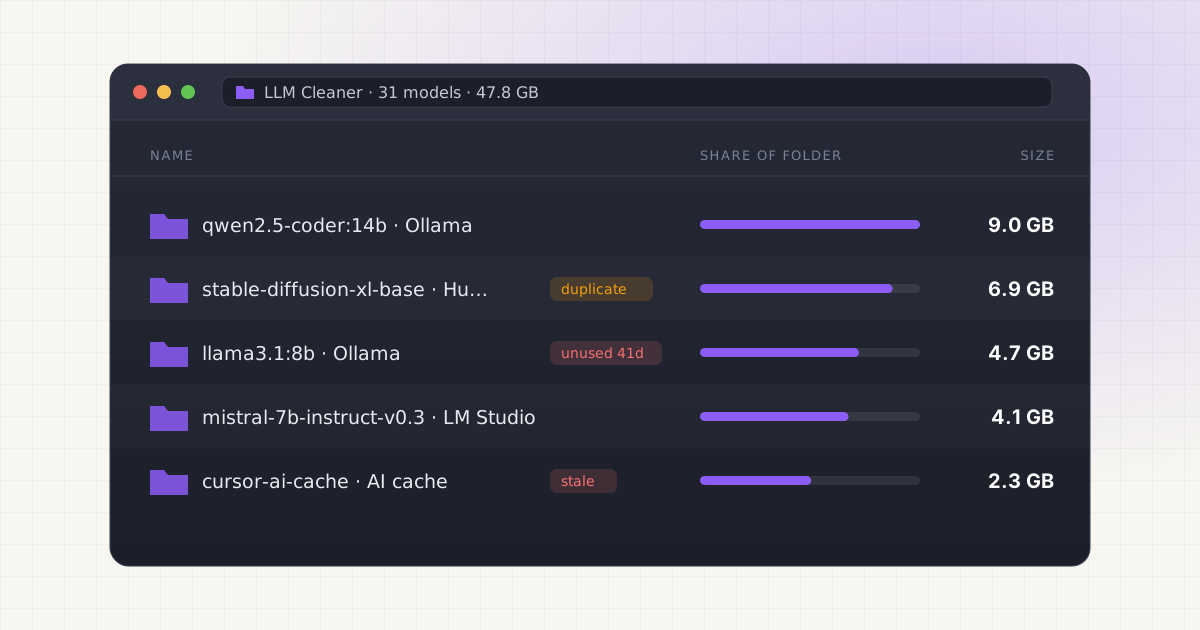
We just shipped LLM Cleaner: a macOS app that finds every local AI model file scattered across your Mac, in one place, and lets you safely trash, export, or move whatever you don't need anymore. It's live today at $19, one-time, no subscription.
Key takeaways
- LLM Cleaner scans Ollama, LM Studio, Hugging Face, ComfyUI, Whisper, and AI coding-assistant caches (Cursor, Claude Code, Windsurf/Codeium) in a single pass.
- It's a one-time $19 purchase, not a subscription, and works on up to 2 Macs per license.
- Everything runs locally. No model files, paths, or scan results are ever uploaded anywhere.
- Deletion is trash-first by default, with duplicate detection across tools built in.
Why we built this
Every post on this blog so far has been about the same underlying problem: local AI tooling is genuinely great, and genuinely terrible at cleaning up after itself. We wrote about where Ollama hides its models, Hugging Face's blobs-and-snapshots cache, LM Studio's GGUF sprawl, and how coding assistants like Cursor and Claude Code quietly add their own storage on top of all of it. Every one of those posts ends the same way: the fix requires cross-referencing hashed filenames against manifest files, checking half a dozen hidden directories by hand, and hoping you don't delete something three other tools depend on.
That's not a "check your storage once a year" problem. Pull a few 7-70B models to compare, add a coding assistant or two, and it's easy to lose 60-100GB to files you forgot existed, spread across tools that have no idea the others exist. We got tired of writing guides that all end with "here's how to do this manually, carefully, with a terminal." So we built the tool instead.
Want to skip the hidden-folder hunt?
LLM Cleaner scans your Mac for local AI models, caches, indexes, and project memory — then shows what you can review, reveal, export, or safely move to Trash.
What LLM Cleaner actually does
One scan, one view, across every source: Ollama, LM Studio, Hugging Face, ComfyUI, Whisper, AI coding caches, and any custom folder you add. No more checking six hidden directories separately.
| Feature | What it does |
|---|---|
| Multi-source scanner | Finds .gguf, .safetensors, .bin, .pt, .ckpt, .pth, and .mlx files across every supported tool in one pass |
| Duplicate detection | Flags identical model files stored more than once, such as the same GGUF in LM Studio and in Downloads (same size plus a content fingerprint, not just the filename) |
| Move to external drive | Copies large models to an external drive and leaves a symlink behind, so Ollama/LM Studio/etc. keep working without reconfiguration |
| Trash-first deletion | Nothing is permanently deleted without a second confirmation; everything goes to the same macOS Trash you already use, with one-click restore |
| Custom folder scanning | Add any folder manually; it's remembered between scans |
| Markdown export | Full inventory (source, path, size, modified date, duplicate flags) saved to your Desktop, so you have a record before you touch anything |
It also respects the environment variables these tools already use, $OLLAMA_MODELS and $HF_HOME, so if you've already customized where your models live, LLM Cleaner finds them without extra setup.
What's actually different here
Generic disk cleaners find large files. They don't understand that a blob in Ollama's storage might be referenced by three model tags, or that the same Mistral checkpoint might exist in both your Ollama and LM Studio caches under completely different filenames. Sorting by file size and deleting the biggest thing is exactly the approach that breaks Ollama models silently and wipes out project context that took months to build up.
LLM Cleaner cross-references manifests and blobs, flags identical model files wherever they sit on disk, and separates "rebuildable cache" from "irreplaceable model weight" from "project memory you probably want to keep." That's the actual hard part of this problem, and it's the part a Finder search or a generic Mac cleaner can't do, because it doesn't know what an Ollama manifest is.
Local AI storage is messy. Cleanup should not be.
Find Ollama, LM Studio, Hugging Face, Cursor, Windsurf, Claude Code, Whisper, and loose model files in one place.
Pricing: Founder License, $19, one time
We're launching at $19 as a one-time purchase for the first 100 users, no subscription, no recurring charge. It works on up to 2 Macs per license, and includes updates through the 1.x line. If the price goes up later as the product matures, Founder License holders keep their existing terms.
Payment is processed through Stripe. Your license key and download link arrive immediately after checkout, and activation in the app takes one click, no manual key entry required.
Getting started
- Buy the Founder License, which takes you straight to a page with your license key and download link
- Open the downloaded .dmg and drag LLM Cleaner to Applications
- Right-click → Open on first launch (the app isn't notarized by Apple yet, so Gatekeeper needs one manual override)
- Click Scan. It walks every supported source and shows you a single sortable table, grouped by source, with size and duplicate flags
- Review, export a report if you want a record, then trash or move whatever you don't need
Nothing about macOS's built-in Trash changes: everything you remove goes there first, recoverable, until you empty it yourself.
What's next
This is a 0.3.0 release, macOS only (Apple Silicon and Intel, macOS 12+), with Windows support on the roadmap. If you're running into a local AI storage problem this doesn't cover yet, or a tool we don't scan, tell us: hello@getllmcleaner.com.
If you want the deeper technical background on any of the tools LLM Cleaner scans, the rest of this blog covers each one in detail: how Ollama's blob-and-manifest system actually works, what's inside Hugging Face's cache, what Cursor keeps per project, and a full manual cleanup walkthrough if you'd rather do it by hand first and see why we built the tool.
Not sure what is safe to delete?
LLM Cleaner separates models, rebuildable caches, and project memory so you do not treat everything like junk.
Frequently asked questions
Does LLM Cleaner upload my model files or file paths anywhere?
No. It runs entirely on your Mac. No files leave your disk, no scan results are transmitted, and no telemetry is collected. The only network calls the app makes are license activation against getllmcleaner.com and an optional version-check ping, neither of which includes any file data.
What happens if I don't like it?
Because the software is delivered immediately as a download, sales are generally final, but if something is genuinely broken on your setup, email hello@getllmcleaner.com and we'll work it out. See the full terms for details.
Will it break my Ollama or LM Studio setup?
Trash-first deletion means nothing is gone until you empty the Trash, and Move to External Drive leaves a symlink behind so tools keep finding their files at the original path with zero reconfiguration. The scanner is read-only until you explicitly click Trash, Delete, or Move on something.
Can I use one license on more than one Mac?
Yes, up to 2 computers per Founder License: Mac, Windows or Linux, in any combination. If you need to move a license to a new machine beyond that, email hello@getllmcleaner.com.
Is there a Windows or Linux version?
Yes. Update, November 2026: LLM Cleaner now runs on Windows 10 and 11 (x64 and ARM64) and on Linux (Debian, Ubuntu, Fedora, AppImage, and ARM64 machines like the NVIDIA DGX Spark). The Mac app needs macOS 14 or later. See all downloads.